
Compare Evite and Paperless Post pricing, deliverability, and RSVP tools with event-type advice and a planner s checklist to pick the right invite for...
Choose Evite when the party is casual and the guest list is long. Choose Paperless Post when the event calls for a stationery feel and design matters more than saving a few dollars. The real split comes down to cost predictability versus polish. If your list tops 300 or you care a lot about privacy, read the pricing math below before you pick either one.
TL;DR:
• Evite’s flat fee for up to 750 guests makes it more cost-effective for large events, while Paperless Post’s coin system can become expensive with premium templates.
• Evite’s free tier includes ads and has a simple RSVP process, but its premium packages do not roll over leftover guest capacity for multiple events.
• Paperless Post offers designer-quality templates without ads, but its premium designs can quickly increase costs for larger guest lists.
• Both platforms may have deliverability issues, with some invites ending up in spam folders, making testing and proper sender address crucial.
• The choice depends on event style: Evite suits casual, large-scale gatherings, while Paperless Post is better for formal events emphasizing aesthetics.
• Evite vs. Paperless Post at a Glance
• How Much Do Evite and Paperless Post Actually Cost?
• Which Platform Has Better Designs?
• Will Your Invite Actually Land in Guests’ Inboxes?
• Which Platform Makes RSVP Tracking Easier?
• Which Platform Fits Your Event?
• Evite or Paperless Post: The Final Call
• What If Neither Platform Fits?
• What Happens When You Actually Need Help?
• What Happens to Your Guests’ Data?
• A Planner’s Checklist for Sending Digital Invites
• Let Porcci NYC Handle the Party While You Handle the Guest List
• Sources
• FAQ
Evite built its name on being the free, easy option for backyard barbecues, kids’ birthdays, and office happy hours. Its free tier comes with banner ads on the recipient page, but most hosts never notice because the templates are simple and the RSVP process is familiar to almost everyone who’s used email since 2005.
Paperless Post leans into a different lane entirely. It’s the digital version of ordering letterpress stationery, with a coin-based system that charges you per card based on design and guest count. Reviewers consistently point to its designer collaborations and editorial-quality templates as the reason people pay more for it, according to InviteDrop’s comparison of top invitation platforms.
Evite pros:
• Free tier with no per-guest fees
• Familiar, low-friction RSVP flow guests already know
• Strong for large, casual guest lists
Paperless Post pros:
• Editorial-quality templates and designer partnerships
• Ad-free experience for you and your guests
• More refined customization for formal occasions
Pick Evite for a quick, budget-friendly send. Pick Paperless Post when the invite itself is part of the event’s modern wedding pearls styling and the event’s first impression.
The pricing models couldn’t be more different, and that difference is where most hosts get surprised.
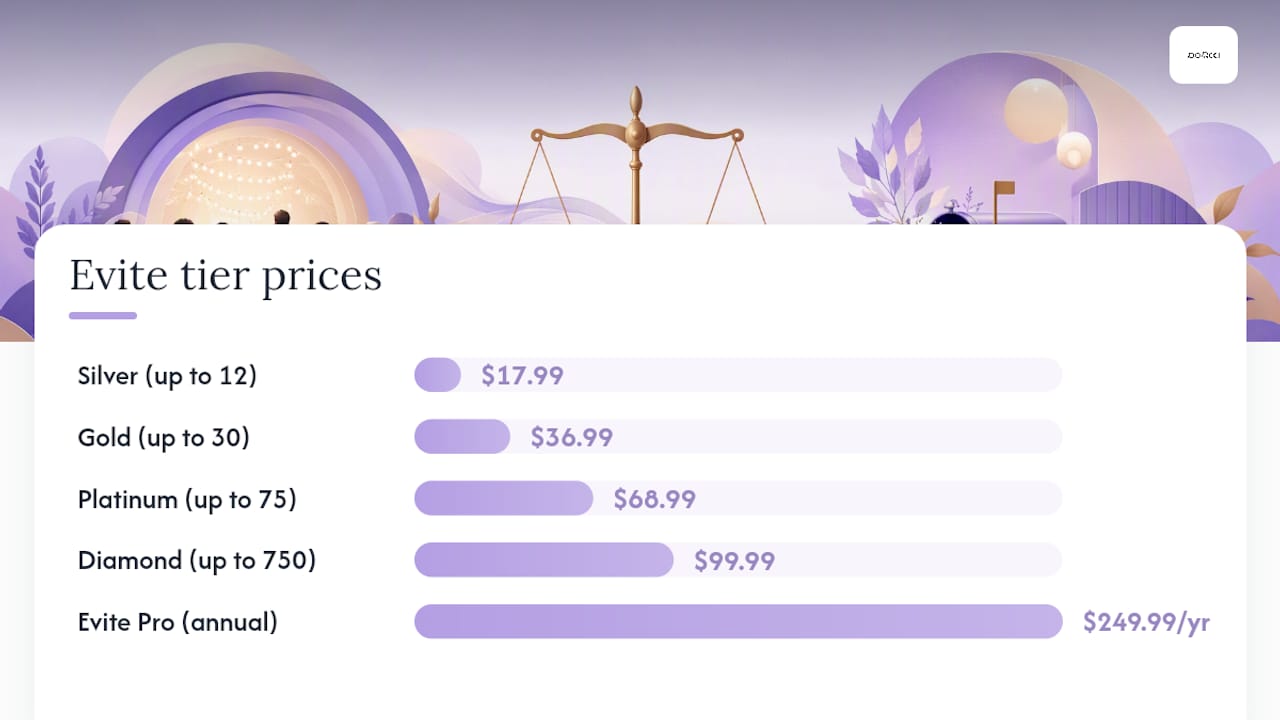
Evite runs on a tiered, per-event system. The free tier works fine but carries ads. Once you want a clean, ad-free design, Evite’s Premium packages charge based on your guest list size: Silver runs $17.99 for up to 12 guests, Gold is $36.99 for up to 30, Platinum is $68.99 for up to 75, and Diamond covers up to 750 guests for $99.99. If you send multiple events a year, Evite Pro is an annual subscription at $249.99 that removes the per-event fee entirely.
Paperless Post works on coins. You buy coin packs, and each card costs a certain number of coins depending on its design and your guest count, with free “flyer” designs available if you’re willing to skip the premium look. This scales in a way that catches hosts off guard, since a fancier template can quietly eat through a coin pack fast, according to Invyt’s breakdown of digital invitation platforms.
Here’s how the math tends to shake out for common guest-list sizes:
1. 25 guests: Evite’s free tier costs $0 (with ads), or Silver Premium runs about $17.99 to $36.99 depending on design. Paperless Post typically lands in a similar range for a mid-tier card, sometimes less if you stick to a simpler template.
2. 100 guests: Evite’s Platinum tier at $68.99 covers up to 75, so you’d likely need Diamond at $99.99. Paperless Post’s coin cost climbs steadily here, and premium designer templates can push the total noticeably higher than Evite’s flat fee.
3. 300 guests: Evite Diamond at $99.99 covers up to 750 guests in one flat package, which makes it hard to beat on pure cost. Paperless Post’s per-guest coin pricing usually makes this list size meaningfully more expensive unless you’re using a free flyer design.
The hidden catch on Evite’s side: aside from Evite Pro, Premium packages are single-event use only. You can’t roll leftover guest capacity into your next party. Paperless Post coins, by contrast, carry over until you spend them, which matters if you’re sending several smaller events across the year instead of one big one.
Evite’s template library is large but leans casual: bold colors, playful icons, and designs built for speed rather than sophistication. Paperless Post’s library skews toward what reviewers describe as editorial quality, complete with designer collaborations that give certain cards a genuine stationery feel, per InviteDrop’s platform rankings.
• Evite: fast template swaps, simple color and text edits, minimal animation
• Paperless Post: envelope liners, digital stamps, double-sided card options, and subtler animated flourishes
• Both platforms let you add photos, but Paperless Post gives more control over layout and typography
One detail that trips up hosts on both platforms: edits you make after sending don’t always update the version a guest already opened. Some changes refresh live, but others lock in as a snapshot the moment the invite goes out. If you catch a typo in the venue address after 50 people already opened the card, don’t assume a fix will reach everyone automatically.
Pro Tip: Send yourself a test invite and open it on both an iPhone and an Android phone, plus Gmail and Outlook, before you send it to the full list. Templates that look sharp on desktop sometimes crop oddly on mobile, and that’s the device most guests will actually RSVP from.
This is the part most comparisons skip, and it matters more than template choice for a lot of hosts.
Evite’s free recipient pages carry ads, which some guests find distracting, though it rarely stops them from RSVPing. Paperless Post skips ads entirely, which reviewers cite as one of its clearest advantages for a polished guest experience, per Invyt’s guide to sending digital invitations.
Deliverability is the bigger risk on either platform. Some Evite invitations land in spam folders, and testing your send before the real one goes out measurably improves the odds it reaches the inbox instead.
• Use a personal or recognizable sender email address rather than a generic no reply address
• Include a plain shareable link as a backup in case the formatted invite gets blocked
• Send yourself and a friend a test invite first, checking both platforms’ spam folders
Neither platform requires guests to create an account to RSVP, which keeps friction low, but always confirm your guest list can actually see the invite before it’s the only copy that exists.
Both platforms cover the basics: custom RSVP questions, automatic reminder emails, and plus-one handling. Where they differ is depth and export flexibility.
• Evite lets hosts add simple custom questions (meal choice, song requests) and send reminder emails on a set schedule
• Paperless Post supports similar RSVP customization with a slightly more polished guest-response interface
• Both allow CSV export of your guest list and RSVP status for tracking outside the platform
• Neither platform offers deep calendar-app integration beyond a basic “add to calendar” button on the invite itself
• Guest caps tie directly to your paid tier. Once you outgrow a package, you either upgrade or, on Evite’s side, consider the Pro annual plan for repeat sending
If you’re managing a guest list with a lot of moving parts, dietary restrictions, plus-ones, multiple events, a dedicated RSVP management workflow outside the invite platform itself often saves more time than either tool’s built-in tracker.
Match the platform to the occasion rather than picking based on habit.
• Kids’ birthday party or backyard cookout: Evite. Free tier, low stakes, guests expect casual.
• Baby shower or milestone birthday: Either works, but Paperless Post’s warmer templates tend to fit the tone better.
• Small, formal wedding or engagement party: Paperless Post. The stationery feel matters when the invite sets expectations for the whole event.
• Large corporate holiday party or community event: Evite, mainly because Diamond’s flat fee for up to 750 guests beats per-guest coin pricing at scale.
• Budget-conscious host sending several small events a year: Consider designing in a premium tool and sending through a lower-cost platform if your guest counts stay small enough to make the math work.
Guest-size and budget sensitivity should drive the decision more than personal preference for one platform’s aesthetic.
Evite pros: free tier, flat per-event pricing at scale, familiar RSVP flow. Evite cons: ads on free invites, occasional spam-folder issues, single-event Premium packages don’t roll over.
Paperless Post pros: designer-quality templates, ad-free guest experience, flexible coin carryover. Paperless Post cons: coin costs climb fast with premium designs, pricier for very large lists, steeper learning curve on pricing.
• Budget host: Evite, especially for lists over 100 guests
• Design-first host: Paperless Post, particularly for weddings or milestone events
• Large-event host: Evite Diamond or Evite Pro if you’re sending multiple big events per year
Next step: buy a small coin pack or send one free test invite before committing to either platform for your full guest list.
Sometimes the right answer is a different category entirely.
• Free mobile-first apps: best when speed matters more than polish and your list is small
• Premium wedding-specific platforms: worth it when you need per-guest tracking tied to seating charts, meal choices, or a formal wedding website
• DIY design plus separate sending: gives you full control over the look, but takes more of your own time
• Planner-managed invites: the right call when you’re already outsourcing other parts of the event and want one less thing to manage yourself
InviteDrop’s roundup breaks these categories down further if your event doesn’t fit neatly into what Evite or Paperless Post offer.
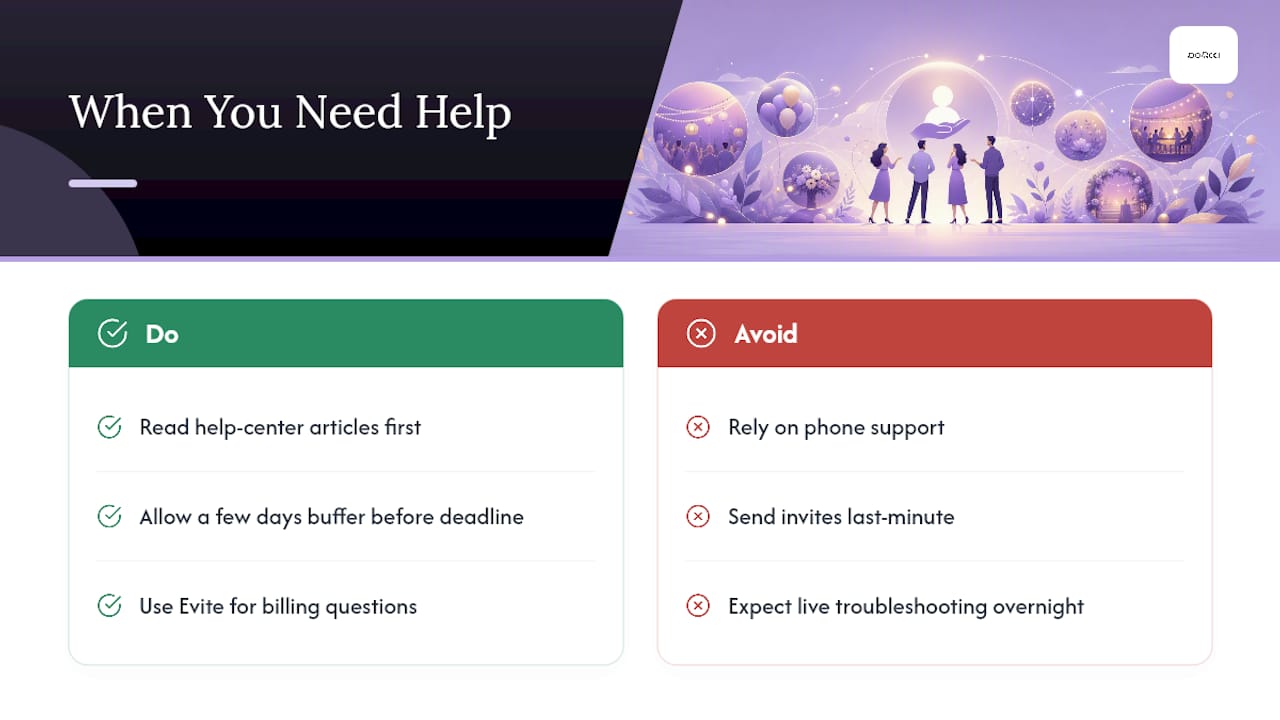
Evite and Paperless Post both offer help centers with searchable articles covering billing, template editing, and RSVP troubleshooting. Neither platform advertises live phone support, which is normal for tools in this price range, but it does mean you’re mostly on your own if something breaks the night before your party.
Evite’s support documentation is thorough on pricing and billing questions specifically, which makes sense given how many hosts have questions about Premium package tiers and Evite Pro renewal terms. If you’re troubleshooting a delivery issue at 11 PM the night before an event, though, you’re reading a help article, not talking to a person.
This is worth factoring into your decision if you tend to send invitations at the last minute. A platform’s design library doesn’t matter much if you can’t get a straight answer about why half your guest list never received their invite. Build in a buffer of at least a few days between sending and your RSVP deadline, so you have time to troubleshoot delivery problems yourself rather than relying on a support ticket to save the day.
Both platforms collect data on invite opens, RSVP responses, and guest email addresses. That’s normal for any digital invitation tool, but it’s worth understanding what happens to that information after your event ends.
Reviewers caution that some invitation platforms use guest data for their own marketing outreach after the event, which means a guest who RSVPs to your baby shower might later get a promotional email from the platform itself, not from you. Reading the privacy policy before you commit to a platform is worth the five minutes, especially if you’re inviting guests who are sensitive about email marketing, according to Invyt’s guide on what to check before sending digital invitations.
Neither Evite nor Paperless Post requires guests to create a full account just to RSVP, which limits how much personal data gets collected on the guest side. If privacy is a priority for your event, particularly for anything involving children or sensitive gatherings, ad-free platforms tend to have less incentive to monetize guest behavior data than free, ad-supported tiers do.
After years of watching invites make or break a party’s turnout, a few habits separate the smooth hosts from the ones fielding “wait, where’s the party?” texts.
Test-send before the real send, every time. Check your own spam folder after. Include venue directions and a clear RSVP deadline right in the invite text, not buried in a link. Keep RSVP questions to two or three max. People abandon long forms. Set one reminder a week out and one two days out, not more.
For guests over 65 or anyone who doesn’t check email often, a follow-up text or phone call still beats the fanciest digital invite. Mixing formats isn’t a failure, it’s just good hosting. For more on building a system around this, our guide to RSVP management covers the reminder cadence that tends to work best.
— PORCCI
Once your invites are out, the real work starts, and that’s where Porcci NYC comes in. We handle the DJ, the photo booth, the AV setup, and the staffing so you’re not juggling five vendors on top of your RSVP spreadsheet. Whether you’re running a milestone birthday, a corporate holiday party, or a backyard celebration that outgrew the backyard, our team delivers, sets up, and breaks down so your only job is showing up and having a good time.
If your guest list is under 30 and the event is simple, DIY invites plus a speaker you already own might be all you need. But once you’re coordinating DJ services, a photo booth, and sound and AV equipment for a bigger crowd, having one team run point saves you the headache of managing four separate rental companies. A few prime dates are still open this season across NYC and New Jersey. Get a quote and let’s talk about what your event actually needs.
• 5 Things to Know Before Sending Digital Invitations | Invyt
• What Is the Best Online Invitation Maker in 2026? (Tested and Ranked) | InviteDrop
Hosts looking for alternatives often turn to Paperless Post for design-first events, free mobile-first apps for speed, or planner-managed services like Porcci NYC when they want the whole event handled, not just the invite.
Paperless Post offers free flyer-style designs with no coin cost, though premium designer templates require coins that scale with your guest count and design choice.
There’s no single best option. Evite wins on cost and simplicity for casual, large events, while Paperless Post wins on design polish for formal occasions, according to InviteDrop’s testing.
Yes. Evite remains a mainstream, budget-friendly choice for casual events, especially large guest lists where its flat per-event pricing beats coin-based alternatives.
Compare Evite and Paperless Post pricing, deliverability, and RSVP tools with event-type advice and a planner s checklist to pick the right invite for...
Choose Evite when the party is casual and the guest list is long. Choose Paperless Post when the event calls for a stationery feel and design matters more than saving a few dollars. The real split comes down to cost predictability versus polish. If your list tops 300 or you care a lot about privacy, read the pricing math below before you pick either one.
TL;DR:
• Evite’s flat fee for up to 750 guests makes it more cost-effective for large events, while Paperless Post’s coin system can become expensive with premium templates.
• Evite’s free tier includes ads and has a simple RSVP process, but its premium packages do not roll over leftover guest capacity for multiple events.
• Paperless Post offers designer-quality templates without ads, but its premium designs can quickly increase costs for larger guest lists.
• Both platforms may have deliverability issues, with some invites ending up in spam folders, making testing and proper sender address crucial.
• The choice depends on event style: Evite suits casual, large-scale gatherings, while Paperless Post is better for formal events emphasizing aesthetics.
• Evite vs. Paperless Post at a Glance
• How Much Do Evite and Paperless Post Actually Cost?
• Which Platform Has Better Designs?
• Will Your Invite Actually Land in Guests’ Inboxes?
• Which Platform Makes RSVP Tracking Easier?
• Which Platform Fits Your Event?
• Evite or Paperless Post: The Final Call
• What If Neither Platform Fits?
• What Happens When You Actually Need Help?
• What Happens to Your Guests’ Data?
• A Planner’s Checklist for Sending Digital Invites
• Let Porcci NYC Handle the Party While You Handle the Guest List
• Sources
• FAQ
Evite built its name on being the free, easy option for backyard barbecues, kids’ birthdays, and office happy hours. Its free tier comes with banner ads on the recipient page, but most hosts never notice because the templates are simple and the RSVP process is familiar to almost everyone who’s used email since 2005.
Paperless Post leans into a different lane entirely. It’s the digital version of ordering letterpress stationery, with a coin-based system that charges you per card based on design and guest count. Reviewers consistently point to its designer collaborations and editorial-quality templates as the reason people pay more for it, according to InviteDrop’s comparison of top invitation platforms.
Evite pros:
• Free tier with no per-guest fees
• Familiar, low-friction RSVP flow guests already know
• Strong for large, casual guest lists
Paperless Post pros:
• Editorial-quality templates and designer partnerships
• Ad-free experience for you and your guests
• More refined customization for formal occasions
Pick Evite for a quick, budget-friendly send. Pick Paperless Post when the invite itself is part of the event’s modern wedding pearls styling and the event’s first impression.
The pricing models couldn’t be more different, and that difference is where most hosts get surprised.
Evite runs on a tiered, per-event system. The free tier works fine but carries ads. Once you want a clean, ad-free design, Evite’s Premium packages charge based on your guest list size: Silver runs $17.99 for up to 12 guests, Gold is $36.99 for up to 30, Platinum is $68.99 for up to 75, and Diamond covers up to 750 guests for $99.99. If you send multiple events a year, Evite Pro is an annual subscription at $249.99 that removes the per-event fee entirely.
Paperless Post works on coins. You buy coin packs, and each card costs a certain number of coins depending on its design and your guest count, with free “flyer” designs available if you’re willing to skip the premium look. This scales in a way that catches hosts off guard, since a fancier template can quietly eat through a coin pack fast, according to Invyt’s breakdown of digital invitation platforms.
Here’s how the math tends to shake out for common guest-list sizes:
1. 25 guests: Evite’s free tier costs $0 (with ads), or Silver Premium runs about $17.99 to $36.99 depending on design. Paperless Post typically lands in a similar range for a mid-tier card, sometimes less if you stick to a simpler template.
2. 100 guests: Evite’s Platinum tier at $68.99 covers up to 75, so you’d likely need Diamond at $99.99. Paperless Post’s coin cost climbs steadily here, and premium designer templates can push the total noticeably higher than Evite’s flat fee.
3. 300 guests: Evite Diamond at $99.99 covers up to 750 guests in one flat package, which makes it hard to beat on pure cost. Paperless Post’s per-guest coin pricing usually makes this list size meaningfully more expensive unless you’re using a free flyer design.
The hidden catch on Evite’s side: aside from Evite Pro, Premium packages are single-event use only. You can’t roll leftover guest capacity into your next party. Paperless Post coins, by contrast, carry over until you spend them, which matters if you’re sending several smaller events across the year instead of one big one.
Evite’s template library is large but leans casual: bold colors, playful icons, and designs built for speed rather than sophistication. Paperless Post’s library skews toward what reviewers describe as editorial quality, complete with designer collaborations that give certain cards a genuine stationery feel, per InviteDrop’s platform rankings.
• Evite: fast template swaps, simple color and text edits, minimal animation
• Paperless Post: envelope liners, digital stamps, double-sided card options, and subtler animated flourishes
• Both platforms let you add photos, but Paperless Post gives more control over layout and typography
One detail that trips up hosts on both platforms: edits you make after sending don’t always update the version a guest already opened. Some changes refresh live, but others lock in as a snapshot the moment the invite goes out. If you catch a typo in the venue address after 50 people already opened the card, don’t assume a fix will reach everyone automatically.
Pro Tip: Send yourself a test invite and open it on both an iPhone and an Android phone, plus Gmail and Outlook, before you send it to the full list. Templates that look sharp on desktop sometimes crop oddly on mobile, and that’s the device most guests will actually RSVP from.
This is the part most comparisons skip, and it matters more than template choice for a lot of hosts.
Evite’s free recipient pages carry ads, which some guests find distracting, though it rarely stops them from RSVPing. Paperless Post skips ads entirely, which reviewers cite as one of its clearest advantages for a polished guest experience, per Invyt’s guide to sending digital invitations.
Deliverability is the bigger risk on either platform. Some Evite invitations land in spam folders, and testing your send before the real one goes out measurably improves the odds it reaches the inbox instead.
• Use a personal or recognizable sender email address rather than a generic no reply address
• Include a plain shareable link as a backup in case the formatted invite gets blocked
• Send yourself and a friend a test invite first, checking both platforms’ spam folders
Neither platform requires guests to create an account to RSVP, which keeps friction low, but always confirm your guest list can actually see the invite before it’s the only copy that exists.
Both platforms cover the basics: custom RSVP questions, automatic reminder emails, and plus-one handling. Where they differ is depth and export flexibility.
• Evite lets hosts add simple custom questions (meal choice, song requests) and send reminder emails on a set schedule
• Paperless Post supports similar RSVP customization with a slightly more polished guest-response interface
• Both allow CSV export of your guest list and RSVP status for tracking outside the platform
• Neither platform offers deep calendar-app integration beyond a basic “add to calendar” button on the invite itself
• Guest caps tie directly to your paid tier. Once you outgrow a package, you either upgrade or, on Evite’s side, consider the Pro annual plan for repeat sending
If you’re managing a guest list with a lot of moving parts, dietary restrictions, plus-ones, multiple events, a dedicated RSVP management workflow outside the invite platform itself often saves more time than either tool’s built-in tracker.
Match the platform to the occasion rather than picking based on habit.
• Kids’ birthday party or backyard cookout: Evite. Free tier, low stakes, guests expect casual.
• Baby shower or milestone birthday: Either works, but Paperless Post’s warmer templates tend to fit the tone better.
• Small, formal wedding or engagement party: Paperless Post. The stationery feel matters when the invite sets expectations for the whole event.
• Large corporate holiday party or community event: Evite, mainly because Diamond’s flat fee for up to 750 guests beats per-guest coin pricing at scale.
• Budget-conscious host sending several small events a year: Consider designing in a premium tool and sending through a lower-cost platform if your guest counts stay small enough to make the math work.
Guest-size and budget sensitivity should drive the decision more than personal preference for one platform’s aesthetic.
Evite pros: free tier, flat per-event pricing at scale, familiar RSVP flow. Evite cons: ads on free invites, occasional spam-folder issues, single-event Premium packages don’t roll over.
Paperless Post pros: designer-quality templates, ad-free guest experience, flexible coin carryover. Paperless Post cons: coin costs climb fast with premium designs, pricier for very large lists, steeper learning curve on pricing.
• Budget host: Evite, especially for lists over 100 guests
• Design-first host: Paperless Post, particularly for weddings or milestone events
• Large-event host: Evite Diamond or Evite Pro if you’re sending multiple big events per year
Next step: buy a small coin pack or send one free test invite before committing to either platform for your full guest list.
Sometimes the right answer is a different category entirely.
• Free mobile-first apps: best when speed matters more than polish and your list is small
• Premium wedding-specific platforms: worth it when you need per-guest tracking tied to seating charts, meal choices, or a formal wedding website
• DIY design plus separate sending: gives you full control over the look, but takes more of your own time
• Planner-managed invites: the right call when you’re already outsourcing other parts of the event and want one less thing to manage yourself
InviteDrop’s roundup breaks these categories down further if your event doesn’t fit neatly into what Evite or Paperless Post offer.
Evite and Paperless Post both offer help centers with searchable articles covering billing, template editing, and RSVP troubleshooting. Neither platform advertises live phone support, which is normal for tools in this price range, but it does mean you’re mostly on your own if something breaks the night before your party.
Evite’s support documentation is thorough on pricing and billing questions specifically, which makes sense given how many hosts have questions about Premium package tiers and Evite Pro renewal terms. If you’re troubleshooting a delivery issue at 11 PM the night before an event, though, you’re reading a help article, not talking to a person.
This is worth factoring into your decision if you tend to send invitations at the last minute. A platform’s design library doesn’t matter much if you can’t get a straight answer about why half your guest list never received their invite. Build in a buffer of at least a few days between sending and your RSVP deadline, so you have time to troubleshoot delivery problems yourself rather than relying on a support ticket to save the day.
Both platforms collect data on invite opens, RSVP responses, and guest email addresses. That’s normal for any digital invitation tool, but it’s worth understanding what happens to that information after your event ends.
Reviewers caution that some invitation platforms use guest data for their own marketing outreach after the event, which means a guest who RSVPs to your baby shower might later get a promotional email from the platform itself, not from you. Reading the privacy policy before you commit to a platform is worth the five minutes, especially if you’re inviting guests who are sensitive about email marketing, according to Invyt’s guide on what to check before sending digital invitations.
Neither Evite nor Paperless Post requires guests to create a full account just to RSVP, which limits how much personal data gets collected on the guest side. If privacy is a priority for your event, particularly for anything involving children or sensitive gatherings, ad-free platforms tend to have less incentive to monetize guest behavior data than free, ad-supported tiers do.
After years of watching invites make or break a party’s turnout, a few habits separate the smooth hosts from the ones fielding “wait, where’s the party?” texts.
Test-send before the real send, every time. Check your own spam folder after. Include venue directions and a clear RSVP deadline right in the invite text, not buried in a link. Keep RSVP questions to two or three max. People abandon long forms. Set one reminder a week out and one two days out, not more.
For guests over 65 or anyone who doesn’t check email often, a follow-up text or phone call still beats the fanciest digital invite. Mixing formats isn’t a failure, it’s just good hosting. For more on building a system around this, our guide to RSVP management covers the reminder cadence that tends to work best.
— PORCCI
Once your invites are out, the real work starts, and that’s where Porcci NYC comes in. We handle the DJ, the photo booth, the AV setup, and the staffing so you’re not juggling five vendors on top of your RSVP spreadsheet. Whether you’re running a milestone birthday, a corporate holiday party, or a backyard celebration that outgrew the backyard, our team delivers, sets up, and breaks down so your only job is showing up and having a good time.
If your guest list is under 30 and the event is simple, DIY invites plus a speaker you already own might be all you need. But once you’re coordinating DJ services, a photo booth, and sound and AV equipment for a bigger crowd, having one team run point saves you the headache of managing four separate rental companies. A few prime dates are still open this season across NYC and New Jersey. Get a quote and let’s talk about what your event actually needs.
• 5 Things to Know Before Sending Digital Invitations | Invyt
• What Is the Best Online Invitation Maker in 2026? (Tested and Ranked) | InviteDrop
Hosts looking for alternatives often turn to Paperless Post for design-first events, free mobile-first apps for speed, or planner-managed services like Porcci NYC when they want the whole event handled, not just the invite.
Paperless Post offers free flyer-style designs with no coin cost, though premium designer templates require coins that scale with your guest count and design choice.
There’s no single best option. Evite wins on cost and simplicity for casual, large events, while Paperless Post wins on design polish for formal occasions, according to InviteDrop’s testing.
Yes. Evite remains a mainstream, budget-friendly choice for casual events, especially large guest lists where its flat per-event pricing beats coin-based alternatives.


