Master sound system setup instructions to ensure clear audio at any event. Get step-by-step guidance to enhance your guests' experience!
TL;DR:
• Proper sound system setup ensures clear, consistent audio for any event by following a step-by-step process. Selecting the right equipment, positioning speakers correctly, and executing the proper power-on sequence are essential to prevent technical issues and ensure even coverage. Conducting a thorough soundcheck at performance volume helps identify and resolve problems before guests arrive, guaranteeing high-quality sound throughout the event.
Sound system setup instructions are a step-by-step framework for assembling, connecting, and testing audio equipment to deliver clear, consistent sound at any event. Whether you are planning a wedding reception, a corporate lecture, or a backyard birthday party, the quality of your audio setup directly shapes how guests experience the event. Professional-grade speakers like the QSC K12.2 and EV ELX200, paired with the right mixers and XLR cables, give you the foundation for reliable sound. Follow these instructions in order, and your audio will be ready before the first guest walks in.
The right gear list is the backbone of any sound system installation guide. Before you touch a cable, confirm you have every item on your checklist.
Speakers and subwoofers are your first priority. Speaker size should match your guest count. Speaker sizing by guest count follows a clear rule: 2× 10-inch active speakers handle up to 80 guests, 2× 12-inch active speakers cover 80–150 guests, 2× 15-inch active speakers serve 150–250 guests, and anything above 250 guests requires a full PA rig with subwoofers. That scale matters because undersized speakers distort at high volumes, which ruins the listening experience for everyone in the room.
Essential cables and adapters keep your signal chain intact. At minimum, bring 4 XLR cables, plus RCA cables and 3.5mm to RCA or XLR adapters. XLR is the industry standard for balanced audio between mixers and powered speakers. Balanced connections reject electrical interference, which is critical in venues with multiple power circuits running simultaneously.
Here is a quick equipment checklist to run through before load-in:
• 2× active speakers (size matched to guest count)
• 1× subwoofer for events with a dancefloor
• Speaker stands rated for your speaker weight
• Mixer or DJ controller (such as a Pioneer DJ DDJ series or Allen & Heath Zedi)
• 4+ XLR cables, RCA cables, 3.5mm adapters
• Power strips and extension cords with surge protection
• Microphones and mic stands (wired or wireless)
• Gaffer tape for cable management
Pro Tip: Pack at least two spare XLR cables and one spare power cord in a separate bag. A single failed cable at the start of a reception can delay your entire setup by 30 minutes.
Speaker placement is where most amateur setups go wrong. The goal is even sound distribution across the entire room, with no dead spots and no echo buildup near hard surfaces.

Start by walking the venue before you unpack anything. Identify power outlet locations, ceiling height, and any acoustic problem areas. Glass walls cause echoes that require specific speaker angling or acoustic treatment to correct. Knowing this before you set up saves you from repositioning heavy equipment mid-event.
Place your main speakers on stands at approximately head height for a seated audience, or slightly above head height for a standing crowd. Stands keep speakers off the floor, which improves projection and reduces low-frequency buildup. Position them at the front corners of the room, angled inward at roughly 45 degrees toward the center of the audience.
| Speaker Size | Recommended Guest Count | Typical Venue Type |
|---|---|---|
| 2× 10-inch active | Up to 80 guests | Small halls, private rooms |
| 2× 12-inch active | 80–150 guests | Mid-size ballrooms, outdoor patios |
| 2× 15-inch active | 150–250 guests | Large ballrooms, warehouses |
| Full PA with subs | 250+ guests | Concert venues, large outdoor events |
Place your subwoofer centrally, near the dancefloor or stage. Central placement distributes bass evenly and prevents one side of the room from feeling heavier than the other. Run all power cables first, then route your audio cables on top. Tape down every cable that crosses a walkway with gaffer tape. Tripping hazards are a liability at any event.
Pro Tip: Test your speaker placement at least 30 minutes before guests arrive. Walk the room while music plays and listen for dead zones near corners or behind pillars. Adjust speaker angle by 5–10 degrees at a time until coverage feels even.
The connection order in your sound system installation steps determines whether your equipment survives the night. Skipping this sequence is the most common cause of blown tweeters and distorted output.
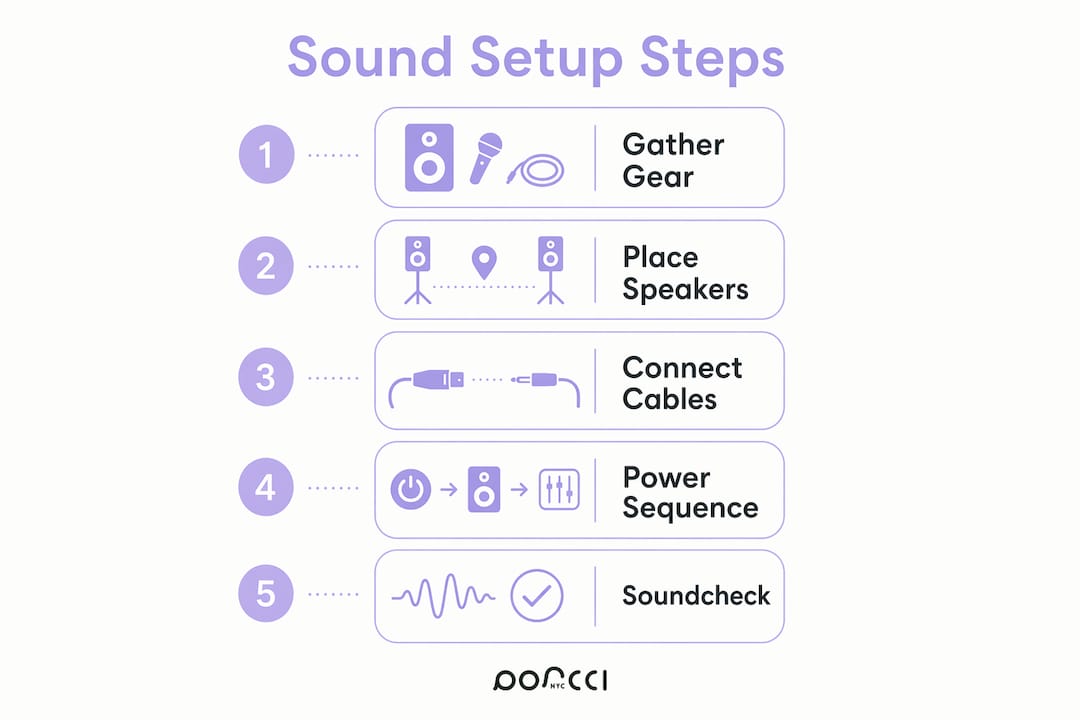
Follow these steps in order:
1. Connect your audio source (laptop, DJ controller, or phone) to the mixer input using the appropriate cable.
2. Connect the mixer’s main output to your powered speakers using XLR cables.
3. Connect the subwoofer to the mixer’s subwoofer output or to the speaker’s pass-through output.
4. Plug all power cables into surge-protected power strips. Do not power anything on yet.
5. Set all volume faders and gain knobs to zero on the mixer.
6. Power on your audio source first, then the mixer, then any outboard gear.
7. Power speakers on last and always turn them off first when shutting down. This prevents voltage pops that can damage speaker drivers.
8. Slowly bring up the mixer’s input gain until your signal is strong but not clipping.
9. Raise the main output fader gradually to your working volume.
10. Play a familiar track and confirm sound from every speaker before adjusting EQ.
Amplifier load should stay between 70% and 80% of total capacity to avoid overload. Running your system at full capacity for hours shortens equipment life and increases the risk of mid-event failure.
Pro Tip: Use a track you know well for your initial soundcheck. Familiar music lets you hear problems immediately. An unfamiliar track makes it harder to tell if something sounds wrong.
A soundcheck is not optional. Soundcheck must happen at actual performance volume, because low-volume testing misses feedback and distortion that only appear when the system is pushed. This is the step most event planners skip, and it is the reason so many events start with audio problems.
Here is how to run an effective soundcheck:
• Play music at the volume you expect during the event, not a quiet preview level.
• Walk the entire room, including the back corners and near any pillars or walls.
• Listen for dead spots where volume drops noticeably, and for echo or reverb buildup near hard surfaces.
• Test every microphone at expected speaking or performance volume. Corporate lectures target 85dB SPL, while concerts often exceed 110dB SPL. Know your target level before you start.
• Check for feedback by slowly raising mic volume until you hear the threshold, then back off 3dB.
• Inspect all cables for secure connections. A loose XLR connector causes intermittent dropouts that are hard to diagnose during a live event.
• Ask venue staff about any sound limiters or decibel restrictions. Some venues in NYC and New Jersey use automatic limiters that cut power if you exceed a set level.
If you hear distortion, lower the input gain first before touching the output fader. Distortion almost always originates at the gain stage, not the output. If you hear uneven volume across the room, adjust speaker angle before reaching for the EQ. EQ fixes tonal problems, not coverage problems.
A properly executed sound system setup, from equipment selection through soundcheck, is the single most reliable way to prevent audio failure at any event.
| Point | Details |
|---|---|
| Match speaker size to guest count | Use 10-inch speakers for under 80 guests, scaling up to a full PA rig for 250 or more. |
| Follow the power-on sequence | Power speakers on last and off first to protect drivers from voltage damage. |
| Run soundcheck at event volume | Low-volume testing misses feedback and distortion that appear only under real conditions. |
| Tape down every cable | Gaffer tape on walkway cables prevents tripping hazards and disconnected connections. |
| Bring spare cables | At least two spare XLR cables prevent a single failure from derailing your entire setup. |
After setting up sound for events ranging from 30-person private dinners to 500-guest wedding receptions, one truth stands out: the setup process reveals every shortcut you took during planning. We have seen events delayed by 45 minutes because someone forgot a single XLR cable. We have watched a corporate presentation fall apart because the soundcheck happened at whisper volume and nobody caught the feedback threshold.
The 1–2 hour setup rule is not a suggestion. It is the minimum buffer between a confident setup and a rushed one. Venues in NYC and New Jersey often have strict load-in windows, and every minute you lose to troubleshooting is a minute you cannot get back. We always tell clients: arrive early, test everything twice, and have a backup plan for your backup plan.
Environmental factors matter more than most people expect. A venue with exposed brick sounds completely different from one with floor-to-ceiling glass. Adjust your EQ and speaker angles to the room, not to a preset. The best sound system configuration for one venue may sound flat or echoey in another. Trust your ears, walk the room, and make small adjustments rather than large ones.
For complex setups or last-minute needs, working with a trusted local rental vendor saves time and reduces risk. You can review event sound system best practices to go deeper on configuration for specific event types.
— PORCCI
Porcci NYC provides professional AV and sound system rentals across New York City and New Jersey, including powered speakers, subwoofers, mixers, wireless microphones, and DJ equipment from professional-grade brands. Every rental comes with expert guidance on setup and configuration, so you are not figuring it out alone on the day of your event. Whether you need a compact two-speaker rig for a private party or a full PA system for a 300-person wedding, Porcci NYC has the equipment and the support to back it up. Browse the full rental catalog and get a quote tailored to your event size, venue, and audio needs. Your focus should stay on the event itself, not on troubleshooting cables.
For a guest count of 80–150, 2× 12-inch active speakers are the standard recommendation. Models like the QSC K12.2 or EV ELX200-12P deliver enough output for mid-size ballrooms and outdoor patios without requiring a subwoofer for most event types.
Arrive at least 1–2 hours before the event starts. The 1–2 hour setup rule gives you time to place equipment, run cables, complete a full soundcheck at performance volume, and fix any issues before guests arrive.
Raise mic volume slowly during soundcheck until you hear the feedback threshold, then reduce the gain by 3dB. Keep microphones pointed away from speakers and avoid placing them directly in front of speaker cabinets.
Power on your audio source first, then the mixer, then any outboard gear, and power speakers on last. When shutting down, reverse the order and turn speakers off first to prevent voltage pops from damaging the drivers.
A subwoofer is recommended for any event with a dancefloor or live music. For corporate lectures and presentations, two main speakers are typically sufficient, since the target output level is around 85dB SPL rather than the higher levels needed for music-driven events.
Master sound system setup instructions to ensure clear audio at any event. Get step-by-step guidance to enhance your guests' experience!
TL;DR:
• Proper sound system setup ensures clear, consistent audio for any event by following a step-by-step process. Selecting the right equipment, positioning speakers correctly, and executing the proper power-on sequence are essential to prevent technical issues and ensure even coverage. Conducting a thorough soundcheck at performance volume helps identify and resolve problems before guests arrive, guaranteeing high-quality sound throughout the event.
Sound system setup instructions are a step-by-step framework for assembling, connecting, and testing audio equipment to deliver clear, consistent sound at any event. Whether you are planning a wedding reception, a corporate lecture, or a backyard birthday party, the quality of your audio setup directly shapes how guests experience the event. Professional-grade speakers like the QSC K12.2 and EV ELX200, paired with the right mixers and XLR cables, give you the foundation for reliable sound. Follow these instructions in order, and your audio will be ready before the first guest walks in.
The right gear list is the backbone of any sound system installation guide. Before you touch a cable, confirm you have every item on your checklist.
Speakers and subwoofers are your first priority. Speaker size should match your guest count. Speaker sizing by guest count follows a clear rule: 2× 10-inch active speakers handle up to 80 guests, 2× 12-inch active speakers cover 80–150 guests, 2× 15-inch active speakers serve 150–250 guests, and anything above 250 guests requires a full PA rig with subwoofers. That scale matters because undersized speakers distort at high volumes, which ruins the listening experience for everyone in the room.
Essential cables and adapters keep your signal chain intact. At minimum, bring 4 XLR cables, plus RCA cables and 3.5mm to RCA or XLR adapters. XLR is the industry standard for balanced audio between mixers and powered speakers. Balanced connections reject electrical interference, which is critical in venues with multiple power circuits running simultaneously.
Here is a quick equipment checklist to run through before load-in:
• 2× active speakers (size matched to guest count)
• 1× subwoofer for events with a dancefloor
• Speaker stands rated for your speaker weight
• Mixer or DJ controller (such as a Pioneer DJ DDJ series or Allen & Heath Zedi)
• 4+ XLR cables, RCA cables, 3.5mm adapters
• Power strips and extension cords with surge protection
• Microphones and mic stands (wired or wireless)
• Gaffer tape for cable management
Pro Tip: Pack at least two spare XLR cables and one spare power cord in a separate bag. A single failed cable at the start of a reception can delay your entire setup by 30 minutes.
Speaker placement is where most amateur setups go wrong. The goal is even sound distribution across the entire room, with no dead spots and no echo buildup near hard surfaces.
Start by walking the venue before you unpack anything. Identify power outlet locations, ceiling height, and any acoustic problem areas. Glass walls cause echoes that require specific speaker angling or acoustic treatment to correct. Knowing this before you set up saves you from repositioning heavy equipment mid-event.
Place your main speakers on stands at approximately head height for a seated audience, or slightly above head height for a standing crowd. Stands keep speakers off the floor, which improves projection and reduces low-frequency buildup. Position them at the front corners of the room, angled inward at roughly 45 degrees toward the center of the audience.
| Speaker Size | Recommended Guest Count | Typical Venue Type |
|---|---|---|
| 2× 10-inch active | Up to 80 guests | Small halls, private rooms |
| 2× 12-inch active | 80–150 guests | Mid-size ballrooms, outdoor patios |
| 2× 15-inch active | 150–250 guests | Large ballrooms, warehouses |
| Full PA with subs | 250+ guests | Concert venues, large outdoor events |
Place your subwoofer centrally, near the dancefloor or stage. Central placement distributes bass evenly and prevents one side of the room from feeling heavier than the other. Run all power cables first, then route your audio cables on top. Tape down every cable that crosses a walkway with gaffer tape. Tripping hazards are a liability at any event.
Pro Tip: Test your speaker placement at least 30 minutes before guests arrive. Walk the room while music plays and listen for dead zones near corners or behind pillars. Adjust speaker angle by 5–10 degrees at a time until coverage feels even.
The connection order in your sound system installation steps determines whether your equipment survives the night. Skipping this sequence is the most common cause of blown tweeters and distorted output.
Follow these steps in order:
1. Connect your audio source (laptop, DJ controller, or phone) to the mixer input using the appropriate cable.
2. Connect the mixer’s main output to your powered speakers using XLR cables.
3. Connect the subwoofer to the mixer’s subwoofer output or to the speaker’s pass-through output.
4. Plug all power cables into surge-protected power strips. Do not power anything on yet.
5. Set all volume faders and gain knobs to zero on the mixer.
6. Power on your audio source first, then the mixer, then any outboard gear.
7. Power speakers on last and always turn them off first when shutting down. This prevents voltage pops that can damage speaker drivers.
8. Slowly bring up the mixer’s input gain until your signal is strong but not clipping.
9. Raise the main output fader gradually to your working volume.
10. Play a familiar track and confirm sound from every speaker before adjusting EQ.
Amplifier load should stay between 70% and 80% of total capacity to avoid overload. Running your system at full capacity for hours shortens equipment life and increases the risk of mid-event failure.
Pro Tip: Use a track you know well for your initial soundcheck. Familiar music lets you hear problems immediately. An unfamiliar track makes it harder to tell if something sounds wrong.
A soundcheck is not optional. Soundcheck must happen at actual performance volume, because low-volume testing misses feedback and distortion that only appear when the system is pushed. This is the step most event planners skip, and it is the reason so many events start with audio problems.
Here is how to run an effective soundcheck:
• Play music at the volume you expect during the event, not a quiet preview level.
• Walk the entire room, including the back corners and near any pillars or walls.
• Listen for dead spots where volume drops noticeably, and for echo or reverb buildup near hard surfaces.
• Test every microphone at expected speaking or performance volume. Corporate lectures target 85dB SPL, while concerts often exceed 110dB SPL. Know your target level before you start.
• Check for feedback by slowly raising mic volume until you hear the threshold, then back off 3dB.
• Inspect all cables for secure connections. A loose XLR connector causes intermittent dropouts that are hard to diagnose during a live event.
• Ask venue staff about any sound limiters or decibel restrictions. Some venues in NYC and New Jersey use automatic limiters that cut power if you exceed a set level.
If you hear distortion, lower the input gain first before touching the output fader. Distortion almost always originates at the gain stage, not the output. If you hear uneven volume across the room, adjust speaker angle before reaching for the EQ. EQ fixes tonal problems, not coverage problems.
A properly executed sound system setup, from equipment selection through soundcheck, is the single most reliable way to prevent audio failure at any event.
| Point | Details |
|---|---|
| Match speaker size to guest count | Use 10-inch speakers for under 80 guests, scaling up to a full PA rig for 250 or more. |
| Follow the power-on sequence | Power speakers on last and off first to protect drivers from voltage damage. |
| Run soundcheck at event volume | Low-volume testing misses feedback and distortion that appear only under real conditions. |
| Tape down every cable | Gaffer tape on walkway cables prevents tripping hazards and disconnected connections. |
| Bring spare cables | At least two spare XLR cables prevent a single failure from derailing your entire setup. |
After setting up sound for events ranging from 30-person private dinners to 500-guest wedding receptions, one truth stands out: the setup process reveals every shortcut you took during planning. We have seen events delayed by 45 minutes because someone forgot a single XLR cable. We have watched a corporate presentation fall apart because the soundcheck happened at whisper volume and nobody caught the feedback threshold.
The 1–2 hour setup rule is not a suggestion. It is the minimum buffer between a confident setup and a rushed one. Venues in NYC and New Jersey often have strict load-in windows, and every minute you lose to troubleshooting is a minute you cannot get back. We always tell clients: arrive early, test everything twice, and have a backup plan for your backup plan.
Environmental factors matter more than most people expect. A venue with exposed brick sounds completely different from one with floor-to-ceiling glass. Adjust your EQ and speaker angles to the room, not to a preset. The best sound system configuration for one venue may sound flat or echoey in another. Trust your ears, walk the room, and make small adjustments rather than large ones.
For complex setups or last-minute needs, working with a trusted local rental vendor saves time and reduces risk. You can review event sound system best practices to go deeper on configuration for specific event types.
— PORCCI
Porcci NYC provides professional AV and sound system rentals across New York City and New Jersey, including powered speakers, subwoofers, mixers, wireless microphones, and DJ equipment from professional-grade brands. Every rental comes with expert guidance on setup and configuration, so you are not figuring it out alone on the day of your event. Whether you need a compact two-speaker rig for a private party or a full PA system for a 300-person wedding, Porcci NYC has the equipment and the support to back it up. Browse the full rental catalog and get a quote tailored to your event size, venue, and audio needs. Your focus should stay on the event itself, not on troubleshooting cables.
For a guest count of 80–150, 2× 12-inch active speakers are the standard recommendation. Models like the QSC K12.2 or EV ELX200-12P deliver enough output for mid-size ballrooms and outdoor patios without requiring a subwoofer for most event types.
Arrive at least 1–2 hours before the event starts. The 1–2 hour setup rule gives you time to place equipment, run cables, complete a full soundcheck at performance volume, and fix any issues before guests arrive.
Raise mic volume slowly during soundcheck until you hear the feedback threshold, then reduce the gain by 3dB. Keep microphones pointed away from speakers and avoid placing them directly in front of speaker cabinets.
Power on your audio source first, then the mixer, then any outboard gear, and power speakers on last. When shutting down, reverse the order and turn speakers off first to prevent voltage pops from damaging the drivers.
A subwoofer is recommended for any event with a dancefloor or live music. For corporate lectures and presentations, two main speakers are typically sufficient, since the target output level is around 85dB SPL rather than the higher levels needed for music-driven events.