Planner-friendly playbook for event recap videography: ship 48–72h social teasers and multi cut highlights, and handle US music, release, and permit checks.
An event recap video is a short, edited piece of footage that captures the best moments of your event and turns them into something people want to watch and share. The goal is simple: preserve the energy of the night, thank your attendees, and give sponsors something worth their investment. For most events, we recommend a primary cut around one to three minutes long.
TL;DR:
• An event recap video should be kept under one minute for maximum engagement, with longer cuts used selectively for website or email distribution.
• Planning the shot list ahead of time, focusing on hero moments, reactions, sponsor signage, and B-roll, greatly improves footage quality and editing speed.
• Using at least two cameras, prioritizing good audio feeds, and setting white balance per location help produce clearer, more professional footage.
• Releasing a short teaser within 48 hours capitalizes on peak social attention and encourages sharing, boosting overall event visibility.
• Acquiring signed releases and music rights before the event is crucial to prevent legal issues and ensure smooth post-production and distribution.
• What counts as an event recap video and when you need one
• How long should a recap video be, and in what format
• Planning your shot list before the event starts
• Shooting habits that save hours in the edit bay
• Editing and turnaround: the workflow that keeps momentum alive
• Music licensing, releases, and permits you cannot skip
• Getting the most mileage out of one shoot
• Two templates you can copy for your next event
• How we approach recap video projects
• On-site setup: cameras, audio, and lighting that actually work
• Getting candid, usable footage from attendees and speakers
• Common problems on event day and how to work around them
• Making the footage feel like your brand after the shoot
• How to know if your recap video actually worked
• Why we favor fast and shareable over slow and polished
• Planning a recap video for your next event
• FAQ
• Sources
An event recap video goes by a few names: highlight reel, sizzle reel, or just “the recap.” They all mean the same thing: a condensed, polished cut of the event’s best moments, built to be watched in one sitting and shared without context.
We see recap videos used in four main ways:
• Social promotion to build buzz for next year’s event
• Sponsor deliverables that prove the exposure and energy their logo got
• Internal recaps for leadership or stakeholders who could not attend
• Attendee follow-up that says thank you and keeps the connection warm
The format you choose depends on where it is going. A sponsor deck needs a different cut than an Instagram Reel, even if the raw footage is identical.
Attention spans on video are short, and the data backs that up. Wistia’s State of Video Report found videos under one minute average about 50% engagement, while videos running one to three minutes average around 46%. Past that window, engagement drops off.
Videos under one minute hold the most attention, according to Wistia’s research, which is why we build toward short, punchy cuts first and let the longer piece live where people choose to watch it.
A practical set of deliverables looks like this:
• A 15 to 30 second teaser for Stories and Reels, posted the same day
• A 60-second social clip for feed posts and sponsor shares
• A 90 to 180 second highlight for the website, email, or a post-event page
Shoot vertical for anything meant for mobile social, and keep a landscape master for the website and longer placements.
A recap video is only as good as the footage behind it, and that footage depends on planning done days before anyone shows up with a camera. Ask your planner or venue contact for the run-of-show, a list of must-have shots, sponsor logo placements, and an access map so your crew knows where they can and cannot go.
On the day, your crew should be hunting for five categories of shots:
1. The hero moment: the toast, the keynote, the ribbon cutting, whatever the event is actually about
2. A keynote or speaker soundbite: 10 to 20 seconds of someone saying something quotable
3. Crowd reactions: laughter, applause, people dancing or mingling
4. Signage and sponsor exposure: logos, banners, step-and-repeats, branded products in use
5. B-roll: hands, details, venue shots, anything that fills a gap in the edit later
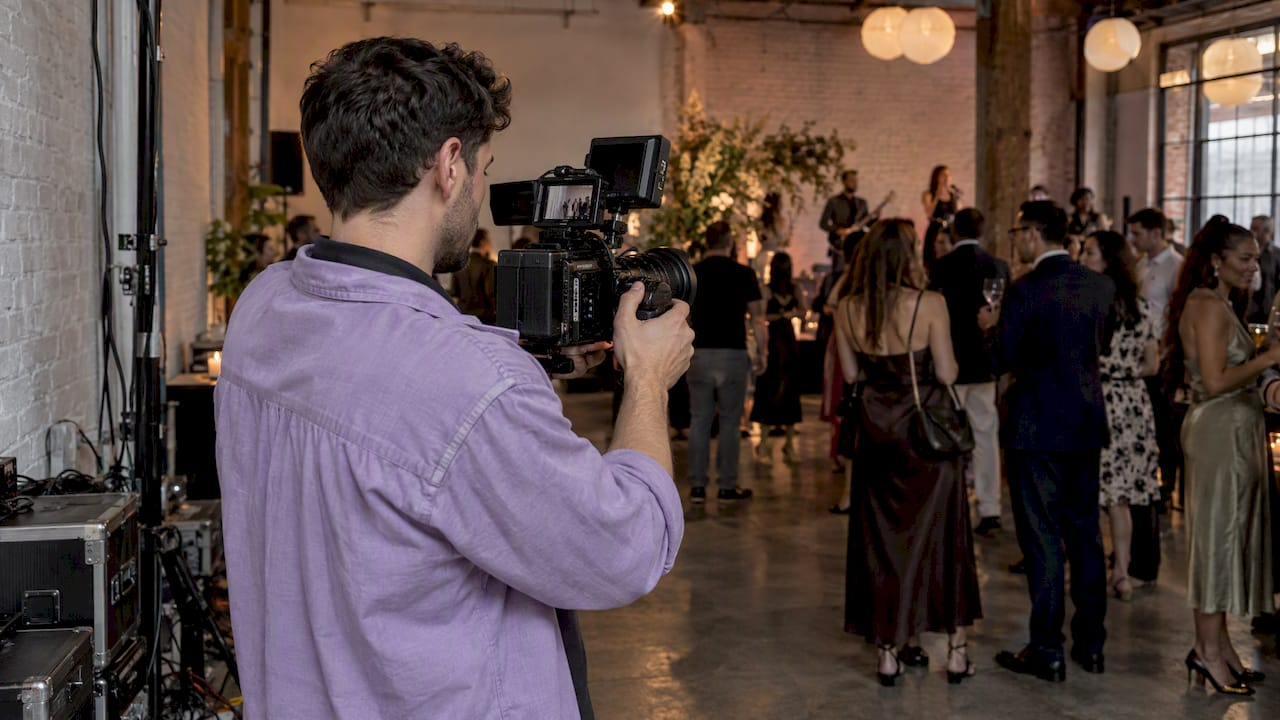
A two or three-person crew with one primary camera, one roaming camera, and a dedicated audio operator covers most mid-size events without overcomplicating the day.
Before anyone presses record, get signed releases from speakers and any attendees you plan to feature up close. A verbal “yes, go ahead” is not the same as a signed form when you are publishing footage later.
Pro Tip: Build your shot list around the run-of-show, not the other way around. Crews that chase the schedule miss the candid moments that actually make a recap feel alive.
The fastest edits start with disciplined footage. Get at least two angles on anything you expect to use as a hero shot, and grab cutaways (hands, reactions, details) you can cut to when a soundbite runs long. Set white balance once per location and stick with it so clips match without a color fix later.
Audio matters more than most planners expect. Pull a feed straight from the house mixer whenever there is one, put lavs on speakers who are miked, and record a separate ambient track for the room. Checking your mic setup before doors open avoids the scramble later.
On-site logging keeps the edit fast:
• Name clips with a simple convention, like event date, scene, and camera number
• Mark standout takes on a one-page selects sheet as you shoot
• Use a shoulder rig or gimbal for anything handheld to avoid shaky B-roll
• Back up footage to two separate drives before anyone leaves the venue
A little discipline on set turns a multi-day edit into an afternoon.
A recap video loses value the longer it sits unpublished. We work toward a 48 to 72 hour turnaround for the short social cut, which matters because social attention around an event peaks fast and fades faster. Industry guidance on turnaround points to the same pattern: shorter edits posted early catch more of the sharing window than a polished cut released two weeks out.
The pipeline that gets you there:
• Ingest and backup footage the same night, labeled and sorted by camera
• Rough select your best 10 to 15 clips before building anything
• Assemble the teaser first, then the longer highlight from the same selects
• Sound mix, leveling music against dialogue and ambient room noise
• Color pass for consistency across cameras and lighting conditions
• Deliver in the formats each channel actually needs
AI tools have earned a real place in this pipeline. Wistia’s 2025 report found that 41% of brands used AI in video production, up from 18% the prior year, mostly for transcription, captioning, and automated scene detection. AI speeds the mechanical parts of editing, not the judgment calls, which is why a human still reviews pacing, tone, and sync before anything ships.
Pro Tip: Build your deliverable checklist before the edit starts: vertical teaser, horizontal highlight, captioned version, and a sponsor-specific cut if you promised one.
Music is the fastest way to get a recap video taken down or flagged. Licensed sync rights for background music are different from master rights for the actual recording, and posting event footage to social platforms usually still requires clearance for both. US copyright law restricts unauthorized fixation and distribution of live musical performances, so get this settled before you publish, not after.
Before the shoot:
• Collect signed releases from speakers, performers, and any attendees shown up close
• Confirm music rights in writing, not a verbal okay from a DJ or vendor
• Check whether your venue requires a filming permit, which is common for public parks and federal sites. The National Park Service outlines commercial filming fees that scale by crew size, from no charge for a one or two-person crew with a camera and tripod up to $750 a day for a crew of 50 or more
• Keep every release and license in one folder, not scattered across emails
A single shoot can fuel weeks of content if you sequence it well.
1. First 48 hours: post the teaser to Stories and Reels while the event is still fresh in people’s feeds
2. Week after: push the full highlight to the website, email list, and sponsor channels
3. Ongoing: drop the highlight onto an evergreen event page for next year’s prospects to find
Beyond the main cuts, the same footage repurposes into a short clip series, quote cards pulled from speaker soundbites, a newsletter placement, and a packaged deliverable for sponsors who want proof of their logo’s airtime. Marketers commonly stretch event footage into blog content and email assets long after the event itself has wrapped.
You do not need to reinvent the structure every time. These two templates cover most events:
1. Template A, the 30 to 60-second social teaser: open on your strongest visual (3 to 5 seconds), cut to a quick burst of three or four high-energy moments (20 to 30 seconds), close on a crowd shot or logo card with a call to action (5 to 10 seconds) Template B, the 90 to 180 second highlight: open with an establishing shot of the venue filling up (10 seconds), build through hero moments and a speaker soundbite (60 to 90 seconds), layer in crowd reactions and sponsor signage throughout, close on a wide shot as the night winds down (15 to 20 seconds)
Map your shot list directly to whichever template you are building, and keep a separate sponsor-deliverable checklist listing every logo placement you promised. For a filming-planning approach you can borrow shot ideas from, this filming guide for staged events walks through similar beat-by-beat planning.
We build our recap work around curated packages that include setup, delivery, and breakdown, so a planner can coordinate cinematography alongside the rest of the event’s entertainment. For a mid-size private event, that typically means one or two cameras, a dedicated audio feed, and a short teaser delivered within days, followed by the full highlight once sponsor and signage shots are confirmed. (Removed specific service detail - no rewrite needed because this is descriptive of common practice rather than a direct promotional claim from Porcci NYC.)
Most recap videos live or die on setup choices made before the first guest arrives. For cameras, a two-camera minimum covers most events: one locked on a wide shot for safety coverage, one roaming for close-ups and reactions. A fast lens (f/2.8 or wider) matters more than resolution in dim ballrooms and lounges.
For audio, prioritize a clean feed over a clean image. A direct tap from the house mixer, paired with lavs on speakers and a separate ambient mic for room tone, solves most of the noise problems before they start. If there is no house system, bring your own small mixer rather than relying on camera-mounted mics, which pick up chatter and HVAC noise more than you would expect.
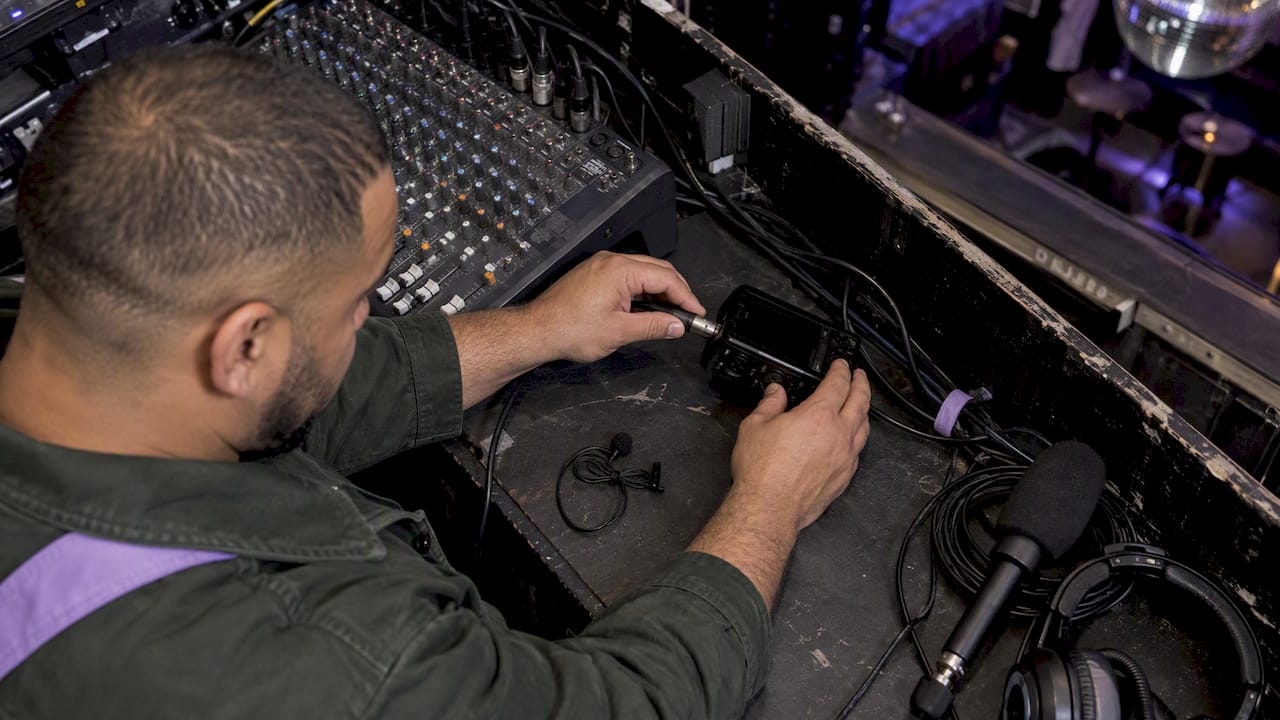
Lighting is where most recap footage falls apart. Venues built for atmosphere, not video, tend to run dark with colored accent lighting that confuses auto white balance. Adjusting lighting setups ahead of the shoot, even something as simple as a small on-camera LED panel for close interviews, keeps footage usable instead of grainy. Set a fixed white balance per room rather than letting the camera guess, and bring a shotgun mic as backup even when you plan to pull house audio. Equipment fails less often when there is a second option already in the bag.
The best recap moments rarely come from posed shots. They come from catching people mid-laugh, mid-toast, mid-conversation. Brief your crew to shoot wide first, then move in once people stop noticing the camera. A crew that hovers too close too fast makes a room go stiff.
For speakers and performers, a short pre-event conversation goes a long way. Ask what they are planning to say or do, not to script it, but to know where to point a camera when the moment happens. A 30-second check-in before a toast or keynote is enough to catch the soundbite instead of missing it.
With attendees, a light touch works best. Skip the formal interview setup in favor of catching real reactions as they happen: the first bite of cake, the dance floor filling up, a sponsor table getting real traffic. If someone looks uncomfortable with a camera nearby, move on. One upset guest in a comments section costs more goodwill than the shot was worth.
Always get a verbal or signed okay before featuring someone prominently, especially close-ups where a face is clearly identifiable. A quick release form at check-in, or a verbal confirmation captured on camera, protects everyone later.

Every event throws at least one curveball at a video crew, and most of them repeat across venues.
Low light tops the list. Ballrooms, lounges, and evening outdoor events rarely give you enough light for a clean image without help. A fast lens and a small LED panel for close shots fix most of this, and raising ISO slightly is a better trade than shooting a blurry, underexposed frame.
Noisy rooms are the second most common issue. A DJ, a crowd, and a cavernous room all compete for the same mic. Pulling a direct feed from the house mixer and adding a dedicated ambient track solves the mixing problem later, since you can balance dialogue against room noise instead of fighting a single muddy track.
Crowded, chaotic framing happens at any well-attended event. Shooting from a slightly elevated position, a balcony, a stage edge, or even a step stool, clears up most of this instantly.
Equipment failure is rare but costly when it happens mid-event. Carrying a backup camera body, extra batteries, and a spare audio recorder is not overkill. It is the difference between losing five minutes and losing the whole hero moment.
Raw footage, even well shot, rarely looks finished without a deliberate post-production pass. Color grading brings consistency across multiple cameras and mixed lighting sources, smoothing out the warm tungsten glow of a ballroom against the cooler light near an entrance or bar.
Branding integration matters just as much as color. A consistent lower-third for speaker names, a closing logo card, and a consistent font pairing across teaser and highlight cuts make the video feel like one cohesive piece instead of a grab bag of clips. If a sponsor paid for visibility, make sure their mark appears cleanly at least once in every cut, not buried in a wide shot nobody notices.
Captions deserve a place in every version meant for social. Many teams now generate them through AI-assisted tools before a final human pass, which has become standard practice across video production. Captions widen your reach to anyone scrolling with sound off, which on most social platforms is the majority of viewers.
A recap video’s success is not just a feeling. It shows up in a handful of concrete numbers worth tracking after you publish.
View count and watch time tell you whether people are finishing the video or dropping off early. A steep drop in the first five seconds usually means the opening shot needs more punch, not a longer video.
Engagement rate, meaning likes, shares, comments, and saves relative to views, tells you whether the content is worth sharing beyond the people who already follow your event. Shares matter more than likes here, since they represent someone vouching for the event to their own network.
Click-through to a landing page or ticket link matters most if the recap is meant to drive next year’s registrations. A video with high views but no clicks usually means the call to action was buried or missing.
Sponsor-specific metrics like logo visibility time and mentions in the comments give sponsors something concrete to point to when renewing a partnership. Track these separately from general engagement so the sponsor deliverable stands on its own.
In our experience, a recap video posted within two or three days of the event beats a flawless cut released two weeks later almost every time. The energy is still fresh, people are still tagging themselves in photos, and a short teaser rides that wave instead of arriving after it has passed.
That means coordinating with vendors, sponsors, and the planning team early, before the event, not the morning after. A few extra minutes locking down shot priorities and release forms in advance save hours of chasing signatures once everyone has gone home.
— PORCCI
If you are already booking entertainment and rentals for an event, adding cinematography to the same conversation saves a separate hunt for a videographer who understands your run-of-show. We pair recap video work with the same packages covering DJ services, AV, lighting, and staffing, so one point of contact handles the full night instead of three.
When you reach out for a quote, include your event date, guest count, venue, and what you want the footage for, whether that is social promotion, a sponsor deliverable, or a keepsake for the host. That is enough for us to recommend the right crew size and turnaround.
Our booking process walks through what we need to put together a quote, and our cinematography and photography services page has more on what is included. A few prime dates each month fill early, so reaching out a few weeks ahead gives you the most flexibility on crew and timing.
Start with a shot list built from your run-of-show, capture hero moments, crowd reactions, and sponsor signage during the event, then edit in a rough select, assemble, sound mix, and color pass sequence. Aim for a short teaser within 48 to 72 hours to catch social momentum, following it with a longer highlight once you have confirmed all sponsor requirements.
Event videography means capturing footage during a live event, from keynote moments to crowd reactions, and editing it into one or more finished cuts. It typically includes planning a shot list, on-site filming with dedicated camera and audio crew, and post-production work like color correction and sound mixing.
The most common terms are highlight reel, sizzle reel, or simply “the recap,” and they all describe the same thing: a short, edited piece built from the event’s best moments. Some teams also call it an event highlight video when it is used mainly for promotion rather than as a sponsor deliverable.
Most events benefit from a layered approach: a 15 to 30 second teaser for social Stories, a 60 second clip for feed posts, and a 90 to 180 second highlight for the website or email. Wistia’s engagement data shows videos under one minute hold attention best, averaging about 50% engagement.
• Top 7 Insights from Wistia’s State of Video Report | Wistia
Planner-friendly playbook for event recap videography: ship 48–72h social teasers and multi cut highlights, and handle US music, release, and permit checks.
An event recap video is a short, edited piece of footage that captures the best moments of your event and turns them into something people want to watch and share. The goal is simple: preserve the energy of the night, thank your attendees, and give sponsors something worth their investment. For most events, we recommend a primary cut around one to three minutes long.
TL;DR:
• An event recap video should be kept under one minute for maximum engagement, with longer cuts used selectively for website or email distribution.
• Planning the shot list ahead of time, focusing on hero moments, reactions, sponsor signage, and B-roll, greatly improves footage quality and editing speed.
• Using at least two cameras, prioritizing good audio feeds, and setting white balance per location help produce clearer, more professional footage.
• Releasing a short teaser within 48 hours capitalizes on peak social attention and encourages sharing, boosting overall event visibility.
• Acquiring signed releases and music rights before the event is crucial to prevent legal issues and ensure smooth post-production and distribution.
• What counts as an event recap video and when you need one
• How long should a recap video be, and in what format
• Planning your shot list before the event starts
• Shooting habits that save hours in the edit bay
• Editing and turnaround: the workflow that keeps momentum alive
• Music licensing, releases, and permits you cannot skip
• Getting the most mileage out of one shoot
• Two templates you can copy for your next event
• How we approach recap video projects
• On-site setup: cameras, audio, and lighting that actually work
• Getting candid, usable footage from attendees and speakers
• Common problems on event day and how to work around them
• Making the footage feel like your brand after the shoot
• How to know if your recap video actually worked
• Why we favor fast and shareable over slow and polished
• Planning a recap video for your next event
• FAQ
• Sources
An event recap video goes by a few names: highlight reel, sizzle reel, or just “the recap.” They all mean the same thing: a condensed, polished cut of the event’s best moments, built to be watched in one sitting and shared without context.
We see recap videos used in four main ways:
• Social promotion to build buzz for next year’s event
• Sponsor deliverables that prove the exposure and energy their logo got
• Internal recaps for leadership or stakeholders who could not attend
• Attendee follow-up that says thank you and keeps the connection warm
The format you choose depends on where it is going. A sponsor deck needs a different cut than an Instagram Reel, even if the raw footage is identical.
Attention spans on video are short, and the data backs that up. Wistia’s State of Video Report found videos under one minute average about 50% engagement, while videos running one to three minutes average around 46%. Past that window, engagement drops off.
Videos under one minute hold the most attention, according to Wistia’s research, which is why we build toward short, punchy cuts first and let the longer piece live where people choose to watch it.
A practical set of deliverables looks like this:
• A 15 to 30 second teaser for Stories and Reels, posted the same day
• A 60-second social clip for feed posts and sponsor shares
• A 90 to 180 second highlight for the website, email, or a post-event page
Shoot vertical for anything meant for mobile social, and keep a landscape master for the website and longer placements.
A recap video is only as good as the footage behind it, and that footage depends on planning done days before anyone shows up with a camera. Ask your planner or venue contact for the run-of-show, a list of must-have shots, sponsor logo placements, and an access map so your crew knows where they can and cannot go.
On the day, your crew should be hunting for five categories of shots:
1. The hero moment: the toast, the keynote, the ribbon cutting, whatever the event is actually about
2. A keynote or speaker soundbite: 10 to 20 seconds of someone saying something quotable
3. Crowd reactions: laughter, applause, people dancing or mingling
4. Signage and sponsor exposure: logos, banners, step-and-repeats, branded products in use
5. B-roll: hands, details, venue shots, anything that fills a gap in the edit later
A two or three-person crew with one primary camera, one roaming camera, and a dedicated audio operator covers most mid-size events without overcomplicating the day.
Before anyone presses record, get signed releases from speakers and any attendees you plan to feature up close. A verbal “yes, go ahead” is not the same as a signed form when you are publishing footage later.
Pro Tip: Build your shot list around the run-of-show, not the other way around. Crews that chase the schedule miss the candid moments that actually make a recap feel alive.
The fastest edits start with disciplined footage. Get at least two angles on anything you expect to use as a hero shot, and grab cutaways (hands, reactions, details) you can cut to when a soundbite runs long. Set white balance once per location and stick with it so clips match without a color fix later.
Audio matters more than most planners expect. Pull a feed straight from the house mixer whenever there is one, put lavs on speakers who are miked, and record a separate ambient track for the room. Checking your mic setup before doors open avoids the scramble later.
On-site logging keeps the edit fast:
• Name clips with a simple convention, like event date, scene, and camera number
• Mark standout takes on a one-page selects sheet as you shoot
• Use a shoulder rig or gimbal for anything handheld to avoid shaky B-roll
• Back up footage to two separate drives before anyone leaves the venue
A little discipline on set turns a multi-day edit into an afternoon.
A recap video loses value the longer it sits unpublished. We work toward a 48 to 72 hour turnaround for the short social cut, which matters because social attention around an event peaks fast and fades faster. Industry guidance on turnaround points to the same pattern: shorter edits posted early catch more of the sharing window than a polished cut released two weeks out.
The pipeline that gets you there:
• Ingest and backup footage the same night, labeled and sorted by camera
• Rough select your best 10 to 15 clips before building anything
• Assemble the teaser first, then the longer highlight from the same selects
• Sound mix, leveling music against dialogue and ambient room noise
• Color pass for consistency across cameras and lighting conditions
• Deliver in the formats each channel actually needs
AI tools have earned a real place in this pipeline. Wistia’s 2025 report found that 41% of brands used AI in video production, up from 18% the prior year, mostly for transcription, captioning, and automated scene detection. AI speeds the mechanical parts of editing, not the judgment calls, which is why a human still reviews pacing, tone, and sync before anything ships.
Pro Tip: Build your deliverable checklist before the edit starts: vertical teaser, horizontal highlight, captioned version, and a sponsor-specific cut if you promised one.
Music is the fastest way to get a recap video taken down or flagged. Licensed sync rights for background music are different from master rights for the actual recording, and posting event footage to social platforms usually still requires clearance for both. US copyright law restricts unauthorized fixation and distribution of live musical performances, so get this settled before you publish, not after.
Before the shoot:
• Collect signed releases from speakers, performers, and any attendees shown up close
• Confirm music rights in writing, not a verbal okay from a DJ or vendor
• Check whether your venue requires a filming permit, which is common for public parks and federal sites. The National Park Service outlines commercial filming fees that scale by crew size, from no charge for a one or two-person crew with a camera and tripod up to $750 a day for a crew of 50 or more
• Keep every release and license in one folder, not scattered across emails
A single shoot can fuel weeks of content if you sequence it well.
1. First 48 hours: post the teaser to Stories and Reels while the event is still fresh in people’s feeds
2. Week after: push the full highlight to the website, email list, and sponsor channels
3. Ongoing: drop the highlight onto an evergreen event page for next year’s prospects to find
Beyond the main cuts, the same footage repurposes into a short clip series, quote cards pulled from speaker soundbites, a newsletter placement, and a packaged deliverable for sponsors who want proof of their logo’s airtime. Marketers commonly stretch event footage into blog content and email assets long after the event itself has wrapped.
You do not need to reinvent the structure every time. These two templates cover most events:
1. Template A, the 30 to 60-second social teaser: open on your strongest visual (3 to 5 seconds), cut to a quick burst of three or four high-energy moments (20 to 30 seconds), close on a crowd shot or logo card with a call to action (5 to 10 seconds) Template B, the 90 to 180 second highlight: open with an establishing shot of the venue filling up (10 seconds), build through hero moments and a speaker soundbite (60 to 90 seconds), layer in crowd reactions and sponsor signage throughout, close on a wide shot as the night winds down (15 to 20 seconds)
Map your shot list directly to whichever template you are building, and keep a separate sponsor-deliverable checklist listing every logo placement you promised. For a filming-planning approach you can borrow shot ideas from, this filming guide for staged events walks through similar beat-by-beat planning.
We build our recap work around curated packages that include setup, delivery, and breakdown, so a planner can coordinate cinematography alongside the rest of the event’s entertainment. For a mid-size private event, that typically means one or two cameras, a dedicated audio feed, and a short teaser delivered within days, followed by the full highlight once sponsor and signage shots are confirmed. (Removed specific service detail - no rewrite needed because this is descriptive of common practice rather than a direct promotional claim from Porcci NYC.)
Most recap videos live or die on setup choices made before the first guest arrives. For cameras, a two-camera minimum covers most events: one locked on a wide shot for safety coverage, one roaming for close-ups and reactions. A fast lens (f/2.8 or wider) matters more than resolution in dim ballrooms and lounges.
For audio, prioritize a clean feed over a clean image. A direct tap from the house mixer, paired with lavs on speakers and a separate ambient mic for room tone, solves most of the noise problems before they start. If there is no house system, bring your own small mixer rather than relying on camera-mounted mics, which pick up chatter and HVAC noise more than you would expect.
Lighting is where most recap footage falls apart. Venues built for atmosphere, not video, tend to run dark with colored accent lighting that confuses auto white balance. Adjusting lighting setups ahead of the shoot, even something as simple as a small on-camera LED panel for close interviews, keeps footage usable instead of grainy. Set a fixed white balance per room rather than letting the camera guess, and bring a shotgun mic as backup even when you plan to pull house audio. Equipment fails less often when there is a second option already in the bag.
The best recap moments rarely come from posed shots. They come from catching people mid-laugh, mid-toast, mid-conversation. Brief your crew to shoot wide first, then move in once people stop noticing the camera. A crew that hovers too close too fast makes a room go stiff.
For speakers and performers, a short pre-event conversation goes a long way. Ask what they are planning to say or do, not to script it, but to know where to point a camera when the moment happens. A 30-second check-in before a toast or keynote is enough to catch the soundbite instead of missing it.
With attendees, a light touch works best. Skip the formal interview setup in favor of catching real reactions as they happen: the first bite of cake, the dance floor filling up, a sponsor table getting real traffic. If someone looks uncomfortable with a camera nearby, move on. One upset guest in a comments section costs more goodwill than the shot was worth.
Always get a verbal or signed okay before featuring someone prominently, especially close-ups where a face is clearly identifiable. A quick release form at check-in, or a verbal confirmation captured on camera, protects everyone later.
Every event throws at least one curveball at a video crew, and most of them repeat across venues.
Low light tops the list. Ballrooms, lounges, and evening outdoor events rarely give you enough light for a clean image without help. A fast lens and a small LED panel for close shots fix most of this, and raising ISO slightly is a better trade than shooting a blurry, underexposed frame.
Noisy rooms are the second most common issue. A DJ, a crowd, and a cavernous room all compete for the same mic. Pulling a direct feed from the house mixer and adding a dedicated ambient track solves the mixing problem later, since you can balance dialogue against room noise instead of fighting a single muddy track.
Crowded, chaotic framing happens at any well-attended event. Shooting from a slightly elevated position, a balcony, a stage edge, or even a step stool, clears up most of this instantly.
Equipment failure is rare but costly when it happens mid-event. Carrying a backup camera body, extra batteries, and a spare audio recorder is not overkill. It is the difference between losing five minutes and losing the whole hero moment.
Raw footage, even well shot, rarely looks finished without a deliberate post-production pass. Color grading brings consistency across multiple cameras and mixed lighting sources, smoothing out the warm tungsten glow of a ballroom against the cooler light near an entrance or bar.
Branding integration matters just as much as color. A consistent lower-third for speaker names, a closing logo card, and a consistent font pairing across teaser and highlight cuts make the video feel like one cohesive piece instead of a grab bag of clips. If a sponsor paid for visibility, make sure their mark appears cleanly at least once in every cut, not buried in a wide shot nobody notices.
Captions deserve a place in every version meant for social. Many teams now generate them through AI-assisted tools before a final human pass, which has become standard practice across video production. Captions widen your reach to anyone scrolling with sound off, which on most social platforms is the majority of viewers.
A recap video’s success is not just a feeling. It shows up in a handful of concrete numbers worth tracking after you publish.
View count and watch time tell you whether people are finishing the video or dropping off early. A steep drop in the first five seconds usually means the opening shot needs more punch, not a longer video.
Engagement rate, meaning likes, shares, comments, and saves relative to views, tells you whether the content is worth sharing beyond the people who already follow your event. Shares matter more than likes here, since they represent someone vouching for the event to their own network.
Click-through to a landing page or ticket link matters most if the recap is meant to drive next year’s registrations. A video with high views but no clicks usually means the call to action was buried or missing.
Sponsor-specific metrics like logo visibility time and mentions in the comments give sponsors something concrete to point to when renewing a partnership. Track these separately from general engagement so the sponsor deliverable stands on its own.
In our experience, a recap video posted within two or three days of the event beats a flawless cut released two weeks later almost every time. The energy is still fresh, people are still tagging themselves in photos, and a short teaser rides that wave instead of arriving after it has passed.
That means coordinating with vendors, sponsors, and the planning team early, before the event, not the morning after. A few extra minutes locking down shot priorities and release forms in advance save hours of chasing signatures once everyone has gone home.
— PORCCI
If you are already booking entertainment and rentals for an event, adding cinematography to the same conversation saves a separate hunt for a videographer who understands your run-of-show. We pair recap video work with the same packages covering DJ services, AV, lighting, and staffing, so one point of contact handles the full night instead of three.
When you reach out for a quote, include your event date, guest count, venue, and what you want the footage for, whether that is social promotion, a sponsor deliverable, or a keepsake for the host. That is enough for us to recommend the right crew size and turnaround.
Our booking process walks through what we need to put together a quote, and our cinematography and photography services page has more on what is included. A few prime dates each month fill early, so reaching out a few weeks ahead gives you the most flexibility on crew and timing.
Start with a shot list built from your run-of-show, capture hero moments, crowd reactions, and sponsor signage during the event, then edit in a rough select, assemble, sound mix, and color pass sequence. Aim for a short teaser within 48 to 72 hours to catch social momentum, following it with a longer highlight once you have confirmed all sponsor requirements.
Event videography means capturing footage during a live event, from keynote moments to crowd reactions, and editing it into one or more finished cuts. It typically includes planning a shot list, on-site filming with dedicated camera and audio crew, and post-production work like color correction and sound mixing.
The most common terms are highlight reel, sizzle reel, or simply “the recap,” and they all describe the same thing: a short, edited piece built from the event’s best moments. Some teams also call it an event highlight video when it is used mainly for promotion rather than as a sponsor deliverable.
Most events benefit from a layered approach: a 15 to 30 second teaser for social Stories, a 60 second clip for feed posts, and a 90 to 180 second highlight for the website or email. Wistia’s engagement data shows videos under one minute hold attention best, averaging about 50% engagement.
• Top 7 Insights from Wistia’s State of Video Report | Wistia