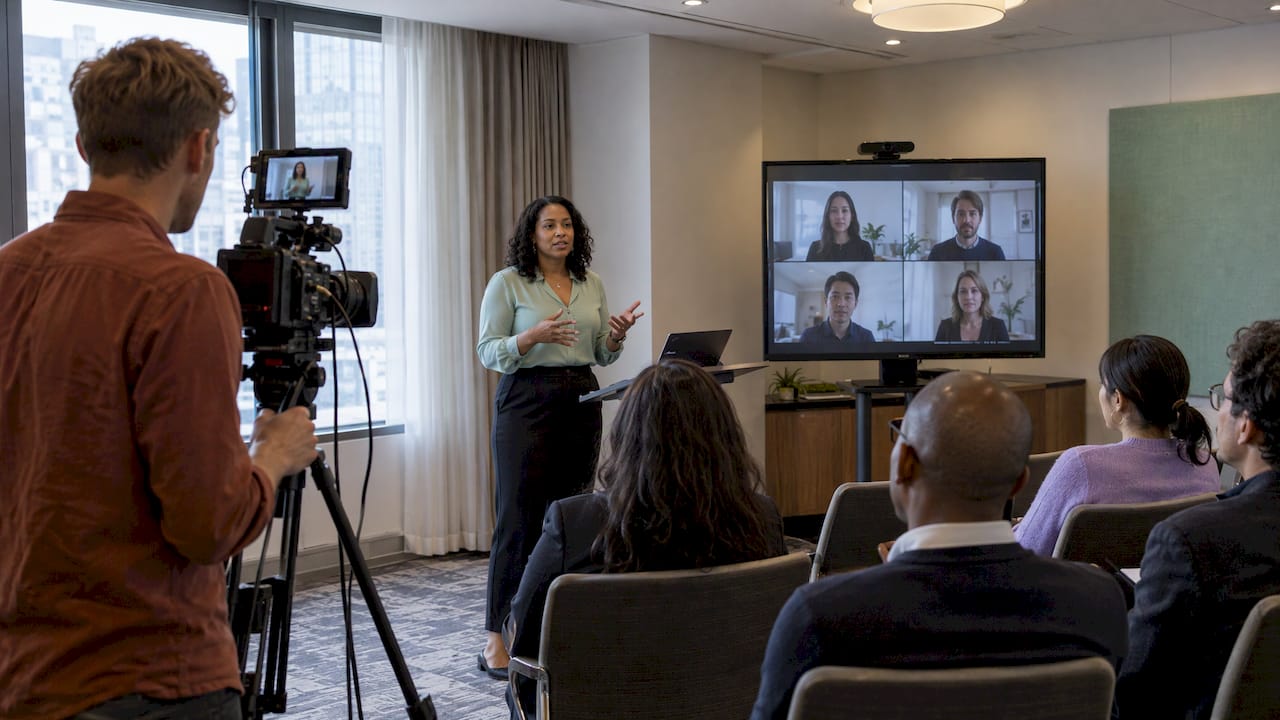
Hybrid event AV options explained: audio, cameras, displays, internet and crew, plus how to size a setup for your room and your remote audience in NYC.
A hybrid event works when the people in the room and the people on the screen both feel like they are at the same event. That comes down to five AV choices: audio, cameras, displays, internet and the crew who run it all. Get the audio right first, add one or two cameras, make sure the upload speed holds, and rehearse in the actual room. Everything else is detail.
We set up sound, lighting and AV for events across NYC and New Jersey, from a 40-person office gathering to a packed ballroom. This guide walks through the options in the order we plan them, so you can decide what you need before you call anyone.
• A hybrid event has live in-person and remote participation at the same time. A recorded or streamed in-person event alone usually does not count.
• Audio matters most. Remote guests forgive a soft picture far sooner than a muffled or echoing voice.
• Plan at least one camera, ideally two, plus a screen so the room can see the remote audience.
• Check upload speed at the venue, not just download, and have a backup connection.
• Size the setup to one main room and one remote audience, then rehearse in the real space.
• TL;DR
• What counts as a hybrid event
• Audio: where hybrid events succeed or fail
• Internet: the part nobody sees until it fails
• Matching the setup to your event size
• FAQ
• Sources
Before you pick equipment, get the definition straight, because it changes what you need. IEEE’s events team explains that in a virtual event everything happens online. In a hybrid event, some elements and some attendee participation happen in person at a physical location while others happen virtually.
That is different from filming a live event. Kaltura’s hybrid events guide states that recording an in-person event and offering it on demand is not hybrid, and neither is a live-streamed in-person event on its own. The remote audience needs a way to take part.
In practice that means three things for your AV plan:
1. Remote guests can hear the room clearly, including questions from the audience.
2. The room can hear remote guests, through speakers or a screen.
3. Someone is watching both sides and managing the flow.
If you want the planning side as well as the gear, we cover it in our hybrid event planning guide.
When you ask for an AV quote for a hybrid event, Stanford’s Research and Development Events team notes it could include video and cameras, audio, staging and lighting. Here is how we break those down:
| Category | What it does | Typical hybrid use |
|---|---|---|
| Microphones | Capture presenters and the audience | Presenter mic, handhelds for Q&A, room mics |
| Mixer or audio processor | Controls what goes to the room and what goes online | Keeps remote voices from echoing back |
| Speakers | Fill the room with sound | Presentations, remote guest audio |
| Cameras | Show the stage, speaker and crowd | One wide shot, one close-up |
| Video switcher or laptop feed | Chooses what remote viewers see | Switching between slides and cameras |
| Displays or projection | Show slides and remote guests to the room | Screens placed so presenters can see them too |
| Lighting | Makes people look good on camera | Even light on the stage or lectern |
| Internet connection | Carries the stream | Wired primary line plus a backup |
| Crew | Runs and monitors everything | Camera operator, audio tech, stream monitor |
Not every event needs every row. A 30-person board lunch with five remote executives needs a very different kit from a 300-person product launch. We cover how to size it further down.
If some of these terms are new, our corporate event AV glossary explains them in plain language, and what AV equipment actually is is a good starting read for first-time planners.
Sennheiser puts it bluntly: high-quality audio decides whether hybrid meetings work well or fall apart. We agree from experience. People will sit through a soft video feed. They will not sit through a voice that cuts out or echoes.
The IFAC Hybrid Conference Guide recommends one presenter microphone and two handheld microphones per conference room, with a mixer to manage the streams between microphones, loudspeakers and the computer that sends the stream to the virtual audience. That is a solid baseline for a single room.
Here is how we think about each type:
• Lavalier or headset mic for the speaker. Hands free, consistent distance from the mouth, and the speaker can move.
• Handheld mics for audience questions. Someone passes the mic, or a staffer carries it. This is the step most hybrid events forget, and it is why remote guests miss half the Q&A.
• Room or ceiling mics for meetings. Sennheiser notes that in medium and large meeting rooms, ceiling microphones give wide coverage without crowding the table with gear. They suit roundtable-style formats better than stage events.
For wireless setups in smaller NYC spaces, we have written up what we recommend for mics, mixers and lighting. Much of it applies to speeches and panels as well as karaoke.
The classic hybrid failure is a feedback loop. A remote guest speaks, their voice comes out of the room speakers, the room microphones pick it up, and the platform sends it right back to them. They hear themselves a moment late and stop talking.
The fix is done at the mixer or audio processor. The remote guest’s audio goes to the room speakers, but the feed sent back to the platform contains only the room’s microphones. AV crews call this a mix-minus feed, and many processors add echo cancellation on top. If your venue has a house system, ask who will configure this, because it is not a default setting.

Two habits help as well. Webex Events advises testing your audio sources in advance to avoid echo and looping, and running a lip sync check so remote audio does not drift out of step with the picture.
Speakers should cover the audience evenly without pointing at the microphones. For a room of 50 to 100, a pair of quality powered speakers with a subwoofer for any music is usually enough. Larger rooms need more coverage and sometimes delay speakers. Our AV and sound system packages come in four sizes for exactly this reason, and we go through them below.
Stanford says using at least one camera is encouraged because it is more engaging for the virtual audience than slides and audio alone. It also suggests a second camera for another angle, such as a wide shot and a close-up.
Webex Events recommends at least two cameras so you can cut between presenters, a wide shot of the stage and shots of the audience.
Our rule of thumb:
• One camera: a single speaker at a lectern, a short program, or a small meeting.
• Two cameras: panels, award ceremonies, anything with a stage and an audience reaction worth showing.
• Three or more: large productions with a dedicated director. At that point you want a full crew, not a DIY setup.
Cinematography and photography are part of what we offer, and if you want footage kept after the event, say so early. It changes where cameras go.
Hybrid is a two-way street. Remote guests should be visible to the room, not just audible. Some events put them on big LED or projector screens at the side of the room. Others use a confidence monitor at the front so the speaker can see remote faces and read the chat without turning around.
Place screens where the presenter does not have to look away from the audience, and keep them out of the camera’s line so you do not film a screen of a screen.
A room that looks fine to the eye can look flat or dark on camera. Even, soft light on the speaker’s face matters more than brightness on the walls. If your event also has a social side, such as a cocktail hour after the program, lighting can do double duty. We share ideas in our NYC and NJ event lighting tips and our stage lighting basics.
You can own perfect cameras and still lose the event to a weak connection. Three points from the sources are worth acting on.
1. Speed. Webex Events recommends a minimum of 25 Mbps upload and download, notes the real number may be higher or lower, and says to discuss it with an experienced AV company.
2. Upload, not just download. The same guidance warns that venue quotes may list only download speeds, so confirm upload in writing. Streaming depends on upload.
3. A backup. Webex says the backup option should connect automatically if the main source fails, so nobody has to scramble mid-program.
If you are livestreaming, Stanford suggests the streaming vendor provide an internet requirements document for the venue, covering bandwidth per room, any static or public IPs, and firewall ports to open. Send it to the venue contact weeks ahead, not the morning of.
In NYC, add one more step: ask whether the venue’s Wi-Fi is shared with other events in the building. A wired connection to the streaming computer is safer than Wi-Fi in almost every case.
Your streaming platform should fit your audience, not the other way around. AVIXA’s hybrid production guide suggests choosing a platform such as Zoom or Microsoft Teams that streams reliably and offers chat, Q&A and breakout rooms, and pairing it with a dedicated high-speed connection and quality cameras, microphones and switchers.
A few practical choices:
• Interactive meeting platform: best when remote guests need to speak. Good for team meetings and workshops.
• One-way broadcast with chat and Q&A: better for large audiences where only a few people talk.
• Moderator for the remote side: one person who reads chat questions to the room. This does more for engagement than any piece of hardware.
Webex also recommends a full recording and streaming test before show time to catch lag and video quality issues, which may need tweaks to encoding settings.
Equipment does not run itself. Princeton’s Event Planning Toolkit recommends at least four production support staff for a standard hybrid event, including a camera operator, and says a test run in the actual space with the technology and staff is crucial. That is an academic planning standard for formal events, and your own event may need fewer or more, but it shows how much work sits behind a smooth program.
AVIXA describes the AV/IT professional’s role as integrating lighting, sound and live streaming while monitoring video, audio, connectivity and device performance, ready for anything from login problems to streaming delays. In plain terms, someone should always be watching the stream while someone else watches the room.
1. Arrive early enough to set up in the real room, with the real lighting.
2. Run every mic, including the handhelds, with a remote test guest listening.
3. Share slides from the actual presentation laptop.
4. Have the remote guest speak and confirm no echo in either direction.
5. Check lip sync and video lag.
6. Unplug the main internet connection and confirm the backup takes over.
7. Walk the presenters through where to stand, where to look and how Q&A works.
Stanford offers a useful principle: focus most production resources on a single room, and if the remote audience is small enough, run just one online event with a single streaming-focused crew. Resist the urge to broadcast from every room.
Here is how we would sketch it:
| Event | Room size | Suggested approach |
|---|---|---|
| Team meeting or board lunch | Up to about 20 | Room mics or ceiling mic, one camera, one screen, one laptop for the call |
| Workshop or training | 20 to 60 | Presenter mic, two handhelds, one or two cameras, screen for remote guests, a tech on site |
| Company all-hands or panel | 60 to 150 | Mixer, speakers, two cameras, switching between slides and shots, moderator for remote Q&A |
| Gala, conference or launch | 150 and up | Full audio system, multiple cameras, lighting, dedicated crew, rehearsal day |
These ranges are our planning guide, not a rule. Ceiling height, room shape and how many remote guests need to speak all move the numbers.
The expectations are climbing as well. A 2026 industry piece notes that attendees compare events with streaming platforms and consumer devices and are less forgiving of poor audio or clumsy hybrid setups. A well-planned, simple setup beats an ambitious one that wobbles.
We have set up a lot of rooms across Manhattan, Brooklyn, Queens, Long Island and New Jersey, and the pattern is always the same. The events that feel effortless are the ones where someone planned the sound first.
A hybrid event is really two events sharing one program. The room wants energy, and the remote guests want to feel included. That is why we like to treat audio, light and staffing as one plan instead of three separate rentals. A speaker who is lit well, miked well and cued by a calm tech makes both audiences feel looked after.
We also believe in right-sizing. Not every gathering needs a broadcast truck. Many corporate events, bar and bat mitzvahs with relatives joining from abroad, and community nights need a clean sound system, a good mic plan, a camera or two and a person who knows how it all connects. That is the part we are good at, and it is why our packages include delivery, setup and breakdown so your focus stays on the people.
If you are unsure what your room needs, tell us the headcount, the venue and what the remote guests will do. We will tell you what we would bring.
PORCCI
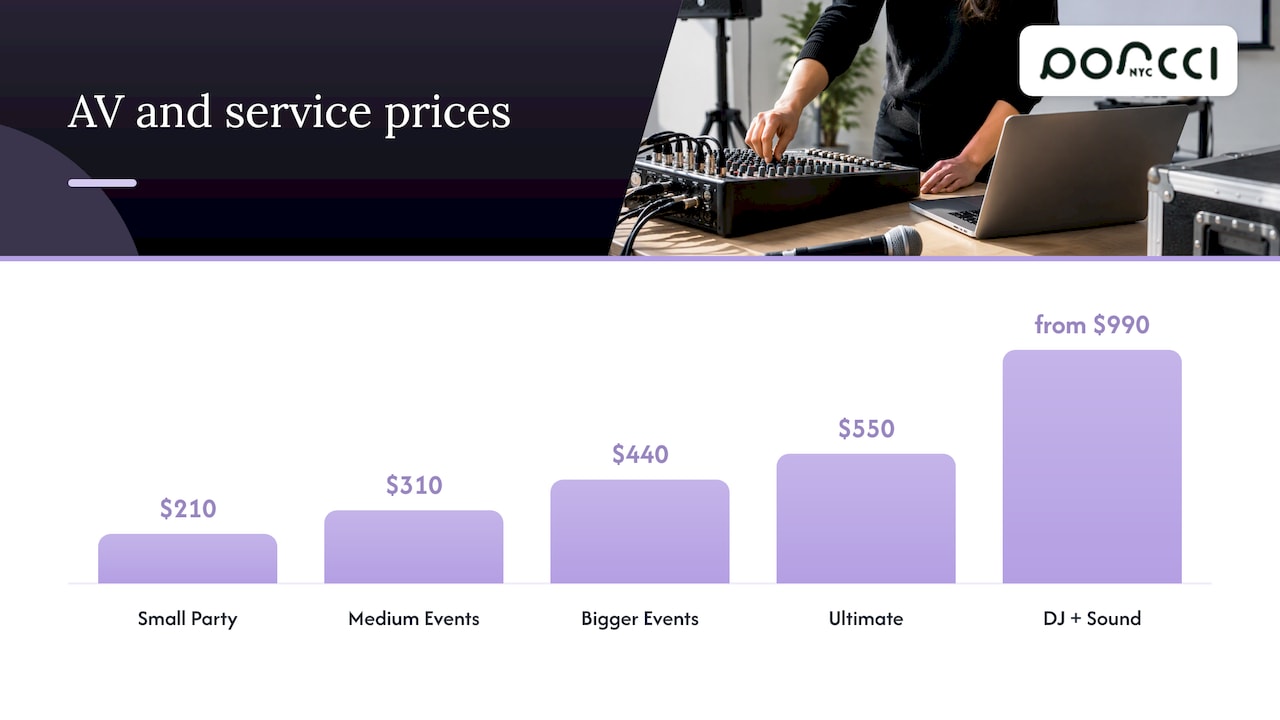
We are an event entertainment and equipment company, and our AV and sound system rentals, event staffing, cinematography and photography, and event hosting are the pieces that most often go into a hybrid plan. Our packages include setup, delivery and breakdown. Here are the published prices for the pieces you are most likely to combine:
| Offer | Price |
|---|---|
| Small Party Package (AV and sound) | $210 |
| Medium Events Package (AV and sound) | $310 |
| Bigger Events Package (AV and sound) | $440 |
| Ultimate Package (AV and sound) | $550 |
| Event or Party MC, Event Host | from $550 |
| DJ Service + Sound System | from $990 |
See the details for each tier on our AV and sound system rental page. If you need hands on deck, our event staffing and event planners and hosts pages explain how we can support the program, and you can reach us through the Porcci NYC site to talk through your event. Local pages are also available for AV rental in Manhattan and AV rental in Brooklyn.
A hybrid event can also have a lighter side. Plenty of our clients add a photo booth or a host to keep the in-room guests engaged while the remote guests watch the main program. Our event atmosphere ideas are a good place to start, and the audio visual basics guide covers the fundamentals in more depth.
At minimum you need microphones, a mixer, speakers, at least one camera, a screen and a reliable internet connection. Princeton’s toolkit lists room microphones for audience Q&A, cameras for stage participants and presentations, and hardware that connects multiple AV devices for video conferencing. Add lighting and staff as the event grows.
A virtual event takes place entirely online. A hybrid event has some participation in person at a physical location and some online, usually at the same time. The remote audience should have a way to interact, not just watch.
AV stands for audio-visual. It covers the sound, video, lighting and display equipment that carry your program to the audience. In a hybrid event it also includes the cameras and connections that carry it to remote guests.
Webex Events recommends at least 25 Mbps for both upload and download, and says the exact need may be higher or lower depending on your setup. Confirm the upload speed with the venue, since quotes sometimes show only download, and arrange a backup connection.
One camera is the minimum for an engaging stream, and two give you a wide shot and a close-up to switch between. Larger productions with panels, audience reactions or multiple stages benefit from more, plus a crew member to operate them.
• Hybrid Events Guide, Kaltura
• A/V Requirements for Digital and Hybrid Events, Stanford R&DE
• Hosting a Hybrid Event, Princeton Event Planning Toolkit
• Hybrid Meetings: Best Practices and Essential Equipment, Sennheiser
• Hybrid Conference Guide, IFAC
• Preparing Your Hybrid Event AV Team, Webex Events
• Hybrid Event Production Guide, AVIXA
• AV innovations reshaping the attendee experience by 2026, Event Technology
Hybrid event AV options explained: audio, cameras, displays, internet and crew, plus how to size a setup for your room and your remote audience in NYC.
A hybrid event works when the people in the room and the people on the screen both feel like they are at the same event. That comes down to five AV choices: audio, cameras, displays, internet and the crew who run it all. Get the audio right first, add one or two cameras, make sure the upload speed holds, and rehearse in the actual room. Everything else is detail.
We set up sound, lighting and AV for events across NYC and New Jersey, from a 40-person office gathering to a packed ballroom. This guide walks through the options in the order we plan them, so you can decide what you need before you call anyone.
• A hybrid event has live in-person and remote participation at the same time. A recorded or streamed in-person event alone usually does not count.
• Audio matters most. Remote guests forgive a soft picture far sooner than a muffled or echoing voice.
• Plan at least one camera, ideally two, plus a screen so the room can see the remote audience.
• Check upload speed at the venue, not just download, and have a backup connection.
• Size the setup to one main room and one remote audience, then rehearse in the real space.
• TL;DR
• What counts as a hybrid event
• Audio: where hybrid events succeed or fail
• Internet: the part nobody sees until it fails
• Matching the setup to your event size
• FAQ
• Sources
Before you pick equipment, get the definition straight, because it changes what you need. IEEE’s events team explains that in a virtual event everything happens online. In a hybrid event, some elements and some attendee participation happen in person at a physical location while others happen virtually.
That is different from filming a live event. Kaltura’s hybrid events guide states that recording an in-person event and offering it on demand is not hybrid, and neither is a live-streamed in-person event on its own. The remote audience needs a way to take part.
In practice that means three things for your AV plan:
1. Remote guests can hear the room clearly, including questions from the audience.
2. The room can hear remote guests, through speakers or a screen.
3. Someone is watching both sides and managing the flow.
If you want the planning side as well as the gear, we cover it in our hybrid event planning guide.
When you ask for an AV quote for a hybrid event, Stanford’s Research and Development Events team notes it could include video and cameras, audio, staging and lighting. Here is how we break those down:
| Category | What it does | Typical hybrid use |
|---|---|---|
| Microphones | Capture presenters and the audience | Presenter mic, handhelds for Q&A, room mics |
| Mixer or audio processor | Controls what goes to the room and what goes online | Keeps remote voices from echoing back |
| Speakers | Fill the room with sound | Presentations, remote guest audio |
| Cameras | Show the stage, speaker and crowd | One wide shot, one close-up |
| Video switcher or laptop feed | Chooses what remote viewers see | Switching between slides and cameras |
| Displays or projection | Show slides and remote guests to the room | Screens placed so presenters can see them too |
| Lighting | Makes people look good on camera | Even light on the stage or lectern |
| Internet connection | Carries the stream | Wired primary line plus a backup |
| Crew | Runs and monitors everything | Camera operator, audio tech, stream monitor |
Not every event needs every row. A 30-person board lunch with five remote executives needs a very different kit from a 300-person product launch. We cover how to size it further down.
If some of these terms are new, our corporate event AV glossary explains them in plain language, and what AV equipment actually is is a good starting read for first-time planners.
Sennheiser puts it bluntly: high-quality audio decides whether hybrid meetings work well or fall apart. We agree from experience. People will sit through a soft video feed. They will not sit through a voice that cuts out or echoes.
The IFAC Hybrid Conference Guide recommends one presenter microphone and two handheld microphones per conference room, with a mixer to manage the streams between microphones, loudspeakers and the computer that sends the stream to the virtual audience. That is a solid baseline for a single room.
Here is how we think about each type:
• Lavalier or headset mic for the speaker. Hands free, consistent distance from the mouth, and the speaker can move.
• Handheld mics for audience questions. Someone passes the mic, or a staffer carries it. This is the step most hybrid events forget, and it is why remote guests miss half the Q&A.
• Room or ceiling mics for meetings. Sennheiser notes that in medium and large meeting rooms, ceiling microphones give wide coverage without crowding the table with gear. They suit roundtable-style formats better than stage events.
For wireless setups in smaller NYC spaces, we have written up what we recommend for mics, mixers and lighting. Much of it applies to speeches and panels as well as karaoke.
The classic hybrid failure is a feedback loop. A remote guest speaks, their voice comes out of the room speakers, the room microphones pick it up, and the platform sends it right back to them. They hear themselves a moment late and stop talking.
The fix is done at the mixer or audio processor. The remote guest’s audio goes to the room speakers, but the feed sent back to the platform contains only the room’s microphones. AV crews call this a mix-minus feed, and many processors add echo cancellation on top. If your venue has a house system, ask who will configure this, because it is not a default setting.
Two habits help as well. Webex Events advises testing your audio sources in advance to avoid echo and looping, and running a lip sync check so remote audio does not drift out of step with the picture.
Speakers should cover the audience evenly without pointing at the microphones. For a room of 50 to 100, a pair of quality powered speakers with a subwoofer for any music is usually enough. Larger rooms need more coverage and sometimes delay speakers. Our AV and sound system packages come in four sizes for exactly this reason, and we go through them below.
Stanford says using at least one camera is encouraged because it is more engaging for the virtual audience than slides and audio alone. It also suggests a second camera for another angle, such as a wide shot and a close-up.
Webex Events recommends at least two cameras so you can cut between presenters, a wide shot of the stage and shots of the audience.
Our rule of thumb:
• One camera: a single speaker at a lectern, a short program, or a small meeting.
• Two cameras: panels, award ceremonies, anything with a stage and an audience reaction worth showing.
• Three or more: large productions with a dedicated director. At that point you want a full crew, not a DIY setup.
Cinematography and photography are part of what we offer, and if you want footage kept after the event, say so early. It changes where cameras go.
Hybrid is a two-way street. Remote guests should be visible to the room, not just audible. Some events put them on big LED or projector screens at the side of the room. Others use a confidence monitor at the front so the speaker can see remote faces and read the chat without turning around.
Place screens where the presenter does not have to look away from the audience, and keep them out of the camera’s line so you do not film a screen of a screen.
A room that looks fine to the eye can look flat or dark on camera. Even, soft light on the speaker’s face matters more than brightness on the walls. If your event also has a social side, such as a cocktail hour after the program, lighting can do double duty. We share ideas in our NYC and NJ event lighting tips and our stage lighting basics.
You can own perfect cameras and still lose the event to a weak connection. Three points from the sources are worth acting on.
1. Speed. Webex Events recommends a minimum of 25 Mbps upload and download, notes the real number may be higher or lower, and says to discuss it with an experienced AV company.
2. Upload, not just download. The same guidance warns that venue quotes may list only download speeds, so confirm upload in writing. Streaming depends on upload.
3. A backup. Webex says the backup option should connect automatically if the main source fails, so nobody has to scramble mid-program.
If you are livestreaming, Stanford suggests the streaming vendor provide an internet requirements document for the venue, covering bandwidth per room, any static or public IPs, and firewall ports to open. Send it to the venue contact weeks ahead, not the morning of.
In NYC, add one more step: ask whether the venue’s Wi-Fi is shared with other events in the building. A wired connection to the streaming computer is safer than Wi-Fi in almost every case.
Your streaming platform should fit your audience, not the other way around. AVIXA’s hybrid production guide suggests choosing a platform such as Zoom or Microsoft Teams that streams reliably and offers chat, Q&A and breakout rooms, and pairing it with a dedicated high-speed connection and quality cameras, microphones and switchers.
A few practical choices:
• Interactive meeting platform: best when remote guests need to speak. Good for team meetings and workshops.
• One-way broadcast with chat and Q&A: better for large audiences where only a few people talk.
• Moderator for the remote side: one person who reads chat questions to the room. This does more for engagement than any piece of hardware.
Webex also recommends a full recording and streaming test before show time to catch lag and video quality issues, which may need tweaks to encoding settings.
Equipment does not run itself. Princeton’s Event Planning Toolkit recommends at least four production support staff for a standard hybrid event, including a camera operator, and says a test run in the actual space with the technology and staff is crucial. That is an academic planning standard for formal events, and your own event may need fewer or more, but it shows how much work sits behind a smooth program.
AVIXA describes the AV/IT professional’s role as integrating lighting, sound and live streaming while monitoring video, audio, connectivity and device performance, ready for anything from login problems to streaming delays. In plain terms, someone should always be watching the stream while someone else watches the room.
1. Arrive early enough to set up in the real room, with the real lighting.
2. Run every mic, including the handhelds, with a remote test guest listening.
3. Share slides from the actual presentation laptop.
4. Have the remote guest speak and confirm no echo in either direction.
5. Check lip sync and video lag.
6. Unplug the main internet connection and confirm the backup takes over.
7. Walk the presenters through where to stand, where to look and how Q&A works.
Stanford offers a useful principle: focus most production resources on a single room, and if the remote audience is small enough, run just one online event with a single streaming-focused crew. Resist the urge to broadcast from every room.
Here is how we would sketch it:
| Event | Room size | Suggested approach |
|---|---|---|
| Team meeting or board lunch | Up to about 20 | Room mics or ceiling mic, one camera, one screen, one laptop for the call |
| Workshop or training | 20 to 60 | Presenter mic, two handhelds, one or two cameras, screen for remote guests, a tech on site |
| Company all-hands or panel | 60 to 150 | Mixer, speakers, two cameras, switching between slides and shots, moderator for remote Q&A |
| Gala, conference or launch | 150 and up | Full audio system, multiple cameras, lighting, dedicated crew, rehearsal day |
These ranges are our planning guide, not a rule. Ceiling height, room shape and how many remote guests need to speak all move the numbers.
The expectations are climbing as well. A 2026 industry piece notes that attendees compare events with streaming platforms and consumer devices and are less forgiving of poor audio or clumsy hybrid setups. A well-planned, simple setup beats an ambitious one that wobbles.
We have set up a lot of rooms across Manhattan, Brooklyn, Queens, Long Island and New Jersey, and the pattern is always the same. The events that feel effortless are the ones where someone planned the sound first.
A hybrid event is really two events sharing one program. The room wants energy, and the remote guests want to feel included. That is why we like to treat audio, light and staffing as one plan instead of three separate rentals. A speaker who is lit well, miked well and cued by a calm tech makes both audiences feel looked after.
We also believe in right-sizing. Not every gathering needs a broadcast truck. Many corporate events, bar and bat mitzvahs with relatives joining from abroad, and community nights need a clean sound system, a good mic plan, a camera or two and a person who knows how it all connects. That is the part we are good at, and it is why our packages include delivery, setup and breakdown so your focus stays on the people.
If you are unsure what your room needs, tell us the headcount, the venue and what the remote guests will do. We will tell you what we would bring.
PORCCI
We are an event entertainment and equipment company, and our AV and sound system rentals, event staffing, cinematography and photography, and event hosting are the pieces that most often go into a hybrid plan. Our packages include setup, delivery and breakdown. Here are the published prices for the pieces you are most likely to combine:
| Offer | Price |
|---|---|
| Small Party Package (AV and sound) | $210 |
| Medium Events Package (AV and sound) | $310 |
| Bigger Events Package (AV and sound) | $440 |
| Ultimate Package (AV and sound) | $550 |
| Event or Party MC, Event Host | from $550 |
| DJ Service + Sound System | from $990 |
See the details for each tier on our AV and sound system rental page. If you need hands on deck, our event staffing and event planners and hosts pages explain how we can support the program, and you can reach us through the Porcci NYC site to talk through your event. Local pages are also available for AV rental in Manhattan and AV rental in Brooklyn.
A hybrid event can also have a lighter side. Plenty of our clients add a photo booth or a host to keep the in-room guests engaged while the remote guests watch the main program. Our event atmosphere ideas are a good place to start, and the audio visual basics guide covers the fundamentals in more depth.
At minimum you need microphones, a mixer, speakers, at least one camera, a screen and a reliable internet connection. Princeton’s toolkit lists room microphones for audience Q&A, cameras for stage participants and presentations, and hardware that connects multiple AV devices for video conferencing. Add lighting and staff as the event grows.
A virtual event takes place entirely online. A hybrid event has some participation in person at a physical location and some online, usually at the same time. The remote audience should have a way to interact, not just watch.
AV stands for audio-visual. It covers the sound, video, lighting and display equipment that carry your program to the audience. In a hybrid event it also includes the cameras and connections that carry it to remote guests.
Webex Events recommends at least 25 Mbps for both upload and download, and says the exact need may be higher or lower depending on your setup. Confirm the upload speed with the venue, since quotes sometimes show only download, and arrange a backup connection.
One camera is the minimum for an engaging stream, and two give you a wide shot and a close-up to switch between. Larger productions with panels, audience reactions or multiple stages benefit from more, plus a crew member to operate them.
• Hybrid Events Guide, Kaltura
• A/V Requirements for Digital and Hybrid Events, Stanford R&DE
• Hosting a Hybrid Event, Princeton Event Planning Toolkit
• Hybrid Meetings: Best Practices and Essential Equipment, Sennheiser
• Hybrid Conference Guide, IFAC
• Preparing Your Hybrid Event AV Team, Webex Events
• Hybrid Event Production Guide, AVIXA
• AV innovations reshaping the attendee experience by 2026, Event Technology


